
Keeping your DEWALT 20V MAX Cordless Drill Driver Set in top condition is essential for safe, efficient, and long-lasting performance. This guide provides clear, practical steps to troubleshoot common issues and perform regular maintenance. Whether you’re experiencing power loss, battery problems, or mechanical issues, these tips will help you resolve problems safely and effectively.

Get business pricing on garage and car supplies
- Business-only prices and quantity discounts
- Tax-exempt purchasing
- Multiple users, one account, clear invoices
Regular care and troubleshooting can extend the life of your drill and ensure it works reliably on every job. Let’s walk through the essential steps to keep your tool running smoothly.
Key Takeaways
| Battery Care | Proper charging and storage extend battery life. |
| Motor Troubleshooting | Check for overheating or unusual noise to prevent damage. |
| Chuck & Bit Maintenance | Regularly clean and tighten to ensure precise operation. |
| LED & Controls | Ensure lights and triggers function correctly for safety. |
| General Maintenance | Keep the tool clean and store in a dry place. |
Initial Inspection and Safety Measures
- Before troubleshooting, unplug the charger and remove the battery from the drill.
- Inspect the drill for visible damage, such as cracks, corrosion, or loose parts.
- Ensure the battery contacts are clean and free of debris.
- Wear safety glasses and gloves if you’re handling internal components.
Always prioritize safety to avoid injury or further damage to your tool.
Troubleshooting Power and Battery Issues
- Check the battery charge level using the LED indicator on the battery. If the battery is depleted, recharge it fully.
- If the battery won’t charge, inspect the charger for damage or debris. Clean contacts with a dry cloth.
- Try using a different compatible battery if available to determine if the issue is with the battery or the tool.
- If the tool still doesn’t power on, reset the battery by removing it for 10 minutes, then reinsert and test.
Battery issues are common; maintaining proper charging habits and using compatible batteries help prevent problems.
Addressing Mechanical and Motor Problems
- Listen for unusual sounds or excessive heat during operation, indicating motor stress or failure.
- Ensure the chuck is properly tightened and free of debris, which can cause slipping or poor engagement.
- Clean the chuck and bits with a brush or compressed air to remove dust and debris.
- If the motor stalls or doesn’t run smoothly, check for obstructions or overheating. Allow the drill to cool before retrying.
- In case of persistent issues, consult a professional technician for internal inspection or repair.
Regular cleaning and proper use prevent motor stress and mechanical failures.
Maintaining the Chuck and Bits
- Remove the bit from the chuck when not in use to prevent unnecessary wear.
- Clean the chuck with a dry cloth and check for any damage or wear.
- Lubricate the chuck lightly with a drop of oil if it becomes stiff or difficult to turn.
- Replace worn or damaged bits to ensure safe and effective drilling.
Proper chuck maintenance enhances accuracy and prolongs the life of your bits and tool.
General Upkeep and Storage
- Keep your drill clean by wiping it down after each use, especially the vents and controls.
- Store the drill and batteries in a cool, dry place away from direct sunlight.
- Charge batteries regularly to prevent deep discharge and capacity loss.
- Use the original charger and avoid overcharging or leaving batteries on the charger for extended periods.
Routine storage and cleaning habits significantly extend your drill’s operational life.
The Products in This Guide

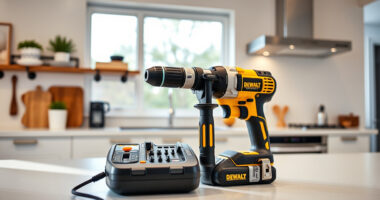
DEWALT 20V MAX Cordless Drill Driver Set
- ✔ Dimensions: 7.6 inches length
- ✔ Trigger Delay: 20 seconds
- ✔ Warranty: 3 years

DEWALT Drill Bit Set
- ✔ Set Size: 14 pieces
- ✔ Tip Type: Split point
- ✔ Coating: Rust-resistant
DEWALT 20V MAX Cordless Drill Driver Set
The DEWALT 20V MAX Cordless Drill Driver Set combines power, precision, and durability. Its brushless motor offers increased run time, and the compact design makes it ideal for tight spaces. Regular maintenance and troubleshooting will keep it performing at its best.
Pros:
- Brushless motor for longer run time
- Compact and lightweight design
- LED work light for visibility
- 2-speed transmission for versatility
Cons:
- Battery life limited by usage
- Chuck may loosen over time
- Requires regular cleaning of vents
Best for: General-purpose drilling, fastening, and DIY projects
Not ideal for: Heavy-duty industrial applications requiring continuous power
Bottom line: A reliable, versatile cordless drill perfect for home and professional use with proper care.
DEWALT Drill Bit Set
Pair your DEWALT drill with this durable 14-piece drill bit set featuring a 135-degree split point for reduced walking and precise drilling into plastic, wood, or metal. The high-speed steel construction and rust-resistant coating ensure longevity.
Pros:
- Versatile 14-piece set
- Split point reduces walking
- High-speed steel for durability
- Rust-resistant coating
Cons:
- Only compatible with standard drills
- Bits may wear faster with heavy use
- Limited to drilling applications
Best for: General drilling tasks across materials
Not ideal for: Heavy industrial drilling or continuous use
Bottom line: A versatile drill bit set that enhances drilling precision and durability for everyday projects.
Frequently Asked Questions
How long does the battery last on a full charge?
The battery’s runtime depends on usage, but with a 2.0 Ah capacity, it typically provides enough power for several hours of moderate work. Using the 5 Ah batteries can extend your work time significantly.
How do I replace or clean the chuck?
To replace or clean the chuck, first remove the battery, then loosen the chuck sleeve by turning it counterclockwise. Use a brush or compressed air to clean debris, and replace if damaged. Tighten securely before use.
What should I do if the drill stops working suddenly?
Check the battery charge first. If charged, inspect for overheating or debris in the chuck. Allow the drill to cool and clean the vents. If problems persist, contact a professional technician.
Can I use other brand batteries with my DEWALT drill?
It is recommended to use DEWALT-branded batteries and chargers to ensure compatibility and safety. Using incompatible batteries may damage the tool or void the warranty.
How often should I perform maintenance on my drill?
Perform basic cleaning and inspection after each use. Deep maintenance, such as cleaning the chuck and checking for loose parts, should be done monthly or after heavy use.
Keep Your DEWALT Drill in Peak Condition
Proper troubleshooting and regular maintenance are key to maximizing the lifespan and performance of your DEWALT 20V MAX Cordless Drill Driver Set. By following these step-by-step tips, you’ll ensure your tool remains reliable and safe for all your projects. Remember, always prioritize safety and consult a professional for complex repairs.
With care and proper handling, your DEWALT drill will serve you well for years to come, making every job easier and more efficient.
Affiliate disclosure: As an Amazon Associate we earn from qualifying purchases. Prices and availability are accurate as of the time of publishing.
Halloween Picks
halloween
As an affiliate, we earn on qualifying purchases.