
If your Milwaukee M18 charger keeps blinking red, it indicates a problem that can often be resolved without professional help. Knowing how to troubleshoot this issue can save you time and keep your tools ready for work. This guide walks you through simple, safe steps to identify and fix common charging problems.
Key Takeaways
| Recognize blinking patterns | Red blinking usually signals a fault or battery issue. |
| Check battery condition | A faulty or incompatible battery can cause the charger to blink red. |
| Inspect charger ports | Debris or damage in the charging port can interfere with proper charging. |
| Monitor temperature | Overheating can trigger red blinking; allow cooling before retrying. |
| Test with different batteries | Using known good batteries helps identify if the issue is with the battery or charger. |
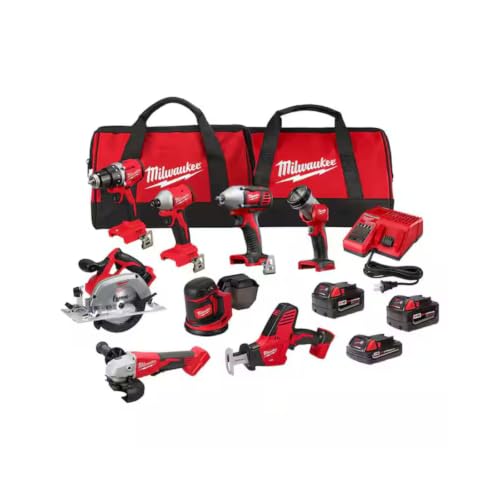
Milwaukee M18 18V Cordless Power Tool Combo Kit, 8-Tool Set, 3 Batteries, 2 Tool Bags, Charger Included
- Complete 8-Tool Set: Hammer drill, impact driver, saw, grinder, reciprocating saw, multi-tool, work light
- Includes 3 Batteries: Two high-capacity and one compact battery
- M18 Lithium-Ion System: Consistent power and extended runtime
As an affiliate, we earn on qualifying purchases.
Step 1: Identify the Blinking Pattern
Observe the pattern of the red blinking. A steady blink often indicates a battery fault, while rapid blinking may point to overheating or charger error. Refer to your charger’s manual for specific blinking codes.
Step 2: Remove and Inspect the Battery
- Disconnect the battery from the charger.
- Check for visible damage, corrosion, or dirt on the contacts.
- If dirty, clean contacts gently with a dry cloth or alcohol wipe.
Step 3: Test with a Different Battery
If you have spare batteries, try charging them to determine if the issue lies with the battery or the charger. If the replacement battery charges normally, your original may need replacing.
Step 4: Check Charger and Battery Temperature
Ensure both the battery and charger are at room temperature. Overheating can cause blinking red lights. Allow them to cool down if hot, then try charging again.
Step 5: Reset and Reconnect
- Disconnect the charger from power.
- Remove the battery and wait 30 seconds.
- Reconnect the battery and plug in the charger. Observe the blinking pattern.
The Products in This Guide

Milwaukee M18 18V Cordless Power Tool Combo Kit
- ✔ Battery Included: 3 batteries
- ✔ Charger Type: Rapid charger
- ✔ Tools Included: 8 tools

Milwaukee Shockwave 100pcs Impact Driver Bit Set Packout
- ✔ Pieces: 100
- ✔ Case: Packout
- ✔ Material: Impact steel
Milwaukee M18 18V Cordless Power Tool Combo Kit
<p>The Milwaukee M18 18V Cordless Power Tool Combo Kit is a versatile set perfect for various construction and maintenance tasks. When facing charging issues, following these troubleshooting steps ensures your tools stay powered and ready.</p>
Pros:
- Includes 8 tools for comprehensive tasks
- 3 batteries with rapid charger
- Durable storage in tool bags
- Compatible with Milwaukee M18 system
Cons:
- Charger blinking red may indicate battery or charger fault
- Initial troubleshooting required for persistent issues
- Requires careful inspection for safety
Best for: Professionals and DIYers needing a complete, reliable power tool set
Not ideal for: If charger blinking persists after troubleshooting, consider replacing the charger or batteries
Bottom line: Regular maintenance and proper troubleshooting keep your Milwaukee tools running smoothly.
Milwaukee Shockwave 100pcs Impact Driver Bit Set Packout
<p>The Milwaukee Shockwave 100pcs Impact Driver Bit Set offers a comprehensive range of impact bits stored in a durable Packout case. It’s a great addition for maximizing your power tool’s versatility and efficiency.</p>
Pros:
- Wide variety of bits for different tasks
- High durability and impact resistance
- Organized storage in Packout case
- Compatible with Milwaukee impact drivers
Cons:
- Set may be overwhelming for casual users
- Bits may wear out with heavy use
- Requires impact driver for best performance
Best for: Professional contractors and serious DIYers
Not ideal for: For light, infrequent use, smaller bit sets may suffice
Bottom line: A versatile, durable set to expand your impact driver capabilities.
Frequently Asked Questions
Why is my Milwaukee charger blinking red?
A blinking red light typically indicates a fault such as overheating, a bad battery, or an internal error. Follow troubleshooting steps to identify the cause.
Can I use any battery with my Milwaukee charger?
It’s best to use Milwaukee M18 batteries compatible with your charger. Using incompatible or damaged batteries can cause charging issues.
How long should I leave my battery on the charger?
Follow the manufacturer’s guidelines. Usually, charging times range from 30 minutes to a few hours, depending on battery capacity.
What should I do if my charger still blinks red after troubleshooting?
If issues persist, consider replacing the charger or batteries, or contact Milwaukee customer support for professional assistance.
Keeping Your Milwaukee Tools Powered
Addressing a blinking red charger on your Milwaukee tools involves careful inspection, testing batteries, and ensuring proper temperature conditions. By following these steps, you can restore reliable charging and keep your tools ready for any job. Regular maintenance and understanding your charger’s signals ensure longer-lasting performance and fewer interruptions on the jobsite.
Affiliate disclosure: As an Amazon Associate we earn from qualifying purchases. Prices and availability are accurate as of the time of publishing.