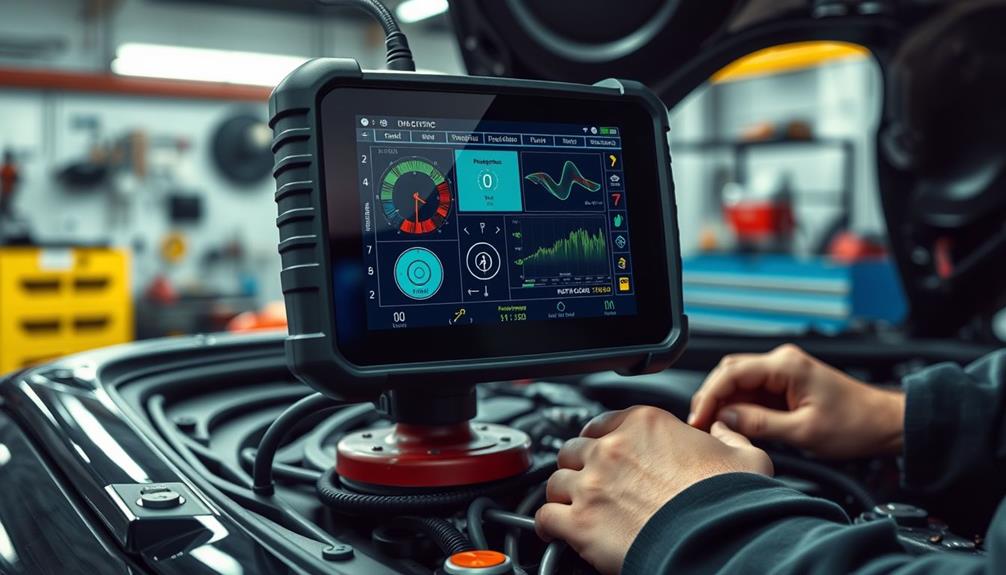
Engine diagnostic scanners range from basic check-engine readers to tools that scan multiple vehicle systems and run service functions. I’d name the Innova 5610 the best overall pick for its bidirectional capabilities, while the BlueDriver Pro stands out for app-based diagnostics and the XTOOL D5S for reset functions. The main tradeoff is how much diagnostic depth you need: a simple code reader can explain an engine warning, but broader scans and controls call for a more advanced tool. Vehicle compatibility and the difference between reading a code and fixing its cause matter as much as the feature list. Read on for the full breakdown and recommendations by buyer type.

Get business pricing on garage and car supplies
- Business-only prices and quantity discounts
- Tax-exempt purchasing
- Multiple users, one account, clear invoices
Complete the kit


Key Takeaways
- Diagnostic depth sets the shortlist: Basic readers such as the ANCEL AD310 and MOTOPOWER MP69033 focus on engine codes, while all-system and bidirectional tools target wider fault-finding jobs.
- The Innova 5610 is the most capable hands-on pick: Its bidirectional functions suit owners who need more than code reading, though its advanced features may be unnecessary for routine warning-light checks.
- BlueDriver Pro favors app-based guidance: It pairs an OBD2 adapter with a phone-based workflow, unlike dedicated-screen scanners that work independently of a phone.
- Extra service functions vary by vehicle: Tools advertising resets or multi-system scans do not necessarily support every function on every model year, so compatibility checks matter before purchase.
- Battery testing is a separate advantage: The Innova 5210 and FOXWELL NT301 Plus add battery-related checks, a useful distinction for owners diagnosing starting concerns alongside engine faults.
| VDIAGTOOL VD10 OBD2 Scanner and Check Engine Code Reader |  | Best for Multilingual Basics | Model: VD10-NEW | Functions: Read and clear codes, live data, freeze frame, I/M readiness, and vehicle information | Code database: More than 3,000 codes | VIEW LATEST PRICE | See Our Full Breakdown |
| FOXWELL NT301 OBD2 Diagnostic Scanner with Live Data |  | Best for Readable Live Data | Model: NT301 | Functions: Read and clear engine fault codes, live-data display and logging, I/M readiness, EVAP, and oxygen sensor tests | Screen: 2.8-inch color | VIEW LATEST PRICE | See Our Full Breakdown |
| ANCEL AD310 OBD2 Code Reader and Diagnostic Scanner | 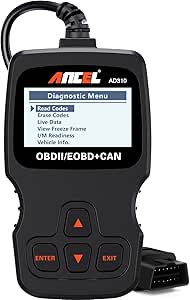 | Best for Simple, No-Frills Checks | Model: AD310 | Functions: Read and clear emission-related codes, live data, freeze frame, and I/M readiness | Supported protocols: KWP2000, J1850 VPW, ISO9141, J1850 PWM, CAN | VIEW LATEST PRICE | See Our Full Breakdown |
| Innova SD35 OBD2 Scanner for All-System Vehicle Diagnostics |  | Best for Multi-System Home Diagnostics | Model: SD35 | Diagnostics: Engine, ABS, SRS, and TPMS codes | Additional functions: Live vehicle data, battery and alternator tests, TPMS checks, oil resets, app-based repair guidance | VIEW LATEST PRICE | See Our Full Breakdown |
| XTOOL D5S OBD2 Scanner with 16 Reset Functions |  | Best for Maintenance and Reset Coverage | Diagnostic systems: Engine, transmission, ABS, SRS, and full OBD2 | Reset functions: 16, including EPB, SAS, battery, throttle body, TPMS, and ABS bleeding | Protocols: Includes CAN FD | VIEW LATEST PRICE | See Our Full Breakdown |
| BlueDriver Pro Bluetooth OBD2 Scanner |  | Best for App-Based Diagnostics | Connectivity: Bluetooth | Compatible devices: iOS and Android phones or tablets | Vehicle compatibility: Gas-powered vehicles made in 1996 or newer; select light-duty trucks and diesels | VIEW LATEST PRICE | See Our Full Breakdown |
| BLCKTEC 460T OBD2 Scanner with 12+ Reset Services |  | Best for Service Functions | Diagnostic systems: Engine, transmission, ABS, SRS, and other vehicle systems | Service functions: 12+ resets, including oil, ABS bleeding, EPB, SAS, DPF, throttle, battery, and TPMS | Live data: OBD2 and OEM data; graph, record, replay, and overlay up to four streams | VIEW LATEST PRICE | See Our Full Breakdown |
| Innova 5210 OBD2 Scanner and Engine Code Reader with Battery Testing and Oil Reset |  | Best for Battery and Charging Checks | Brand and model: Innova 5210 | Vehicle compatibility: Most US, Asian, and European vehicles from 1996 onward; coverage varies | Code functions: Reads and clears OBD2 engine codes and some ABS codes | VIEW LATEST PRICE | See Our Full Breakdown |
| FOXWELL NT301 Plus OBD2 Scanner and 12V Battery Tester |  | Best Standalone Engine-and-Battery Tool | Model: FOXWELL NT301 Plus | Display: 2.8-inch color screen | Functions: Engine-code reading and clearing, live data, I/M readiness, EVAP checks, and 12V battery testing | VIEW LATEST PRICE | See Our Full Breakdown |
| FOXWELL NT604 Elite OBD2 Car Diagnostic Scanner |  | Best for Four-System Fault Checks | Brand and model: FOXWELL NT604 Elite | Diagnostic systems: Engine, ABS, SRS, and transmission | Vehicle coverage: 60+ car brands; compatibility varies by make, model, and year | VIEW LATEST PRICE | See Our Full Breakdown |
| Innova 5610 OBD2 Bidirectional Scan Tool |  | Best for Bidirectional Diagnostics | Systems: Engine, ABS, SRS, and transmission on select vehicles | Vehicle compatibility: Most 1996–2023 OBD2 vehicles; coverage varies by make and model | Diagnostic features: Bidirectional controls and enhanced live data | VIEW LATEST PRICE | See Our Full Breakdown |
| ANCEL AD410 Enhanced OBD2 Scanner |  | Best for Engine and Emissions Checks | Display: 2.4-inch color screen | Vehicle compatibility: Most U.S. OBD2 vehicles from 1996 onward; many EU and Asian vehicles from 2000 onward | Supported protocols: CAN, ISO9141, KWP2000, J1850 VPW, and J1850 PWM | VIEW LATEST PRICE | See Our Full Breakdown |
| FOXWELL NT614 Elite OBD2 Scanner with 4-System Diagnostics and 5 Reset Functions |  | Best for Multi-System Resets | Diagnostic systems: Engine, ABS, SRS, and transmission | Reset functions: ABS bleeding, EPB reset, SAS calibration, oil reset, and throttle relearn | Vehicle coverage: 10,000+ vehicles from 90+ brands; feature availability varies | VIEW LATEST PRICE | See Our Full Breakdown |
| MOTOPOWER MP69033 OBD2 Car Diagnostic Scanner | 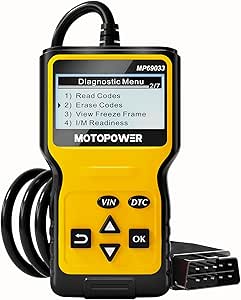 | Best Simple Handheld Code Reader | Display: 2.8-inch LCD with white backlight and contrast adjustment | Cable length: 2.5 feet | Supported protocols: 9 OBD II protocols | VIEW LATEST PRICE | See Our Full Breakdown |
| TOPDON AD600S OBD2 Scanner for Engine, ABS, SRS, and Transmission Diagnostics |  | Best Touchscreen Service Scanner | Display: 5-inch touchscreen | Operating system: Android 11 | Storage: 32 GB | VIEW LATEST PRICE | See Our Full Breakdown |
| engine diagnostic scanner | Vehicle compatibility | Weight |
|---|---|---|
| VDIAGTOOL VD10 OBD2 Scanner an | — | — |
| FOXWELL NT301 OBD2 Diagnostic | Most 1996+ U.S. gasoline cars, light trucks, and SUVs; select 2000+ European and Asian models; compatible 12V diesel vehicles with OBD2 | 0.16 kg |
| ANCEL AD310 OBD2 Code Reader a | Many 1996+ U.S. vehicles and 2000+ EU and Asian vehicles with OBDII | 12 oz |
| Innova SD35 OBD2 Scanner for A | — | — |
| XTOOL D5S OBD2 Scanner with 16 | — | — |
| BlueDriver Pro Bluetooth OBD2 | Gas-powered vehicles made in 1996 or newer; select light-duty trucks and diesels | — |
| BLCKTEC 460T OBD2 Scanner with | OBD2-compliant vehicles from 1996 onward in the USA and Canada; feature support varies | — |
| Innova 5210 OBD2 Scanner and E | Most US, Asian, and European vehicles from 1996 onward; coverage varies | — |
| FOXWELL NT301 Plus OBD2 Scanne | 1996+ U.S., 2001+ European, and 2005+ Asian vehicles via 16-pin OBDII port, with exclusions | 600 g |
| FOXWELL NT604 Elite OBD2 Car D | — | — |
| Innova 5610 OBD2 Bidirectional | Most 1996–2023 OBD2 vehicles; coverage varies by make and model | 1.3 pounds |
| ANCEL AD410 Enhanced OBD2 Scan | Most U.S. OBD2 vehicles from 1996 onward; many EU and Asian vehicles from 2000 onward | 10.56 ounces |
| FOXWELL NT614 Elite OBD2 Scann | — | 1200 g |
| MOTOPOWER MP69033 OBD2 Car Dia | Most U.S. vehicles from 1996, EU and Asian vehicles from 2000, and newer OBD II/CAN vehicles | 10.2 ounces |
| TOPDON AD600S OBD2 Scanner for | — | 630 g |
More Details on Our Top Picks
VDIAGTOOL VD10 OBD2 Scanner and Check Engine Code Reader
The VD10 is a straightforward choice for drivers who want engine-code explanations and basic diagnostic context without a phone app. It reads and clears codes, shows live sensor data and freeze-frame details, and checks I/M readiness, so a warning light can be investigated before a repair visit. Its built-in definitions for more than 3,000 codes and six language options give it an advantage over the more bare-bones ANCEL AD310 for users who want help interpreting a code on the scanner itself. The tradeoff is a small two-line display, which is less suited to following multiple live readings than the FOXWELL NT301’s color screen. It handles standard OBDII engine diagnostics, not broader systems such as ABS or SRS. The listing also gives conflicting warranty durations, so I would verify coverage before buying.
Pros:- Displays definitions for more than 3,000 diagnostic codes
- Includes live data, freeze-frame information, and I/M readiness checks
- Supports six languages and several OBDII protocols
- Draws power from the vehicle, with no separate battery or charger
Cons:- Two-line display is limited for viewing live data
- Works only with compatible OBDII-compliant 12V vehicles
- Warranty duration is inconsistent across the listing
Best for: Drivers who want an affordable-feeling, stand-alone code reader with on-screen definitions, basic live data, and multilingual menus.
Not ideal for: Owners seeking ABS, SRS, or transmission diagnostics, or buyers who need a clearly stated warranty term and a larger display.
- Model:VD10-NEW
- Functions:Read and clear codes, live data, freeze frame, I/M readiness, and vehicle information
- Code database:More than 3,000 codes
- Supported protocols:CAN, ISO9141, KWP2000, J1850 PWM, J1850 VPW
- Compatibility:OBDII-compliant 12V cars, SUVs, and light trucks
- Display:Two-line LCD with white backlight and contrast adjustment
- Languages:English, French, German, Spanish, Italian, Russian
- Power:Powered through the vehicle OBDII connector
- Warranty:Listing states both 5 years and 3 years
Our verdict“Choose the VD10 if on-screen code definitions and multilingual support matter more than a larger screen or diagnostics beyond the engine system.”
FOXWELL NT301 OBD2 Diagnostic Scanner with Live Data
The NT301 is a good fit for drivers who want a clearer view of engine diagnostics than a basic two-line reader provides. Its 2.8-inch color screen and ability to display and log live sensor data make it easier to follow readings while checking a running engine. It also adds I/M readiness, EVAP, and oxygen sensor tests, giving it more emissions-focused checks than the ANCEL AD310. Unlike the broader Innova SD35, though, the NT301 is focused on OBDII engine functions rather than ABS, SRS, or TPMS. Its plug-and-play, vehicle-powered design keeps setup simple, but fit and available functions still vary by year, make, model, and VIN. I’d choose it for routine engine checks, not for owners who want service resets or all-system coverage.
Pros:- 2.8-inch color screen offers more room than basic monochrome readers
- Displays and logs live sensor data
- Includes I/M readiness, EVAP, and oxygen sensor tests
- Supports several common OBDII protocols
Cons:- Coverage and functions vary by vehicle year, make, model, and VIN
- Limited to OBDII-equipped vehicles and engine-related diagnostics
- One-year warranty is shorter than the VD10 listing’s stated warranty, though that listing is inconsistent
Best for: DIY drivers who want a color display, live-data logging, and emissions-related tests for an OBDII-equipped vehicle.
Not ideal for: Owners who need ABS, SRS, TPMS, transmission diagnostics, or maintenance reset functions in the same tool.
- Model:NT301
- Functions:Read and clear engine fault codes, live-data display and logging, I/M readiness, EVAP, and oxygen sensor tests
- Screen:2.8-inch color
- Supported protocols:KWP2000, J1850 VPW, ISO9141, J1850 PWM, CAN
- Vehicle compatibility:Most 1996+ U.S. gasoline cars, light trucks, and SUVs; select 2000+ European and Asian models; compatible 12V diesel vehicles with OBD2
- Weight:0.16 kg
- Included components:Scanner, USB cable, quick reference guide
- Warranty:12 months
Our verdict“Pick the NT301 if a readable color screen and emissions tests matter more than the broader system coverage offered by the Innova SD35.”
ANCEL AD310 OBD2 Code Reader and Diagnostic Scanner
The AD310 keeps engine diagnostics uncomplicated: it reads and clears emission-related codes, displays live data and freeze-frame information, and checks I/M readiness. Since it takes power from the OBDII port, there is no battery or charger to manage, and its 2.5-foot cable gives some flexibility when reading the screen from the driver’s seat. Compared with the VDIAGTOOL VD10, it does not advertise a built-in database of code definitions, so buyers may need another source to interpret unfamiliar faults. Its diagnostic scope is also narrower than the FOXWELL NT301’s added EVAP and oxygen sensor tests. That simplicity suits drivers who want a basic engine-code reader, but it is not a route into ABS, SRS, transmission, or other system diagnostics. Vehicle fit is limited to models with an OBDII interface.
Pros:- Reads and clears emission-related engine codes
- Shows live data, freeze-frame information, and I/M readiness
- Vehicle-powered operation avoids a separate battery or charger
- 2.5-foot cable provides practical reach from the OBDII port
Cons:- Does not diagnose ABS, SRS, transmission, or other non-emission systems
- Does not work with vehicles lacking an OBDII interface
- No built-in code-definition database is specified
Best for: Drivers seeking a compact, direct-use scanner for engine codes, freeze-frame details, and readiness checks on an OBDII vehicle.
Not ideal for: Owners who want on-device code definitions, extra emissions tests, or diagnostics for ABS, SRS, transmission, and other systems.
- Model:AD310
- Functions:Read and clear emission-related codes, live data, freeze frame, and I/M readiness
- Supported protocols:KWP2000, J1850 VPW, ISO9141, J1850 PWM, CAN
- Vehicle compatibility:Many 1996+ U.S. vehicles and 2000+ EU and Asian vehicles with OBDII
- Cable length:2.5 ft
- Weight:12 oz
- Dimensions:8.9 x 6.9 x 1.4 in
- Power:Vehicle OBDII data link connector
Our verdict“Choose the AD310 for basic engine checks and readiness monitoring, but step up to the NT301 if you want additional emissions tests and a color display.”
Innova SD35 OBD2 Scanner for All-System Vehicle Diagnostics
The SD35 makes sense for owners who want to move beyond engine codes without stepping into a more maintenance-heavy scanner like the XTOOL D5S. It reads and clears engine, ABS, SRS, and TPMS codes, displays live data, and adds battery and alternator tests. Oil resets and app-based repair guidance through RepairSolutions2 make it more useful for routine ownership tasks than the engine-focused FOXWELL NT301. The tradeoff is that vehicle coverage varies by model, so the advertised system access may not apply to every car; checking Innova’s Coverage Checker is part of the buying decision. Its 3.5-inch screen is larger than the NT301’s, while the one-year limited warranty and corded setup keep it from being an especially expansive or maintenance-free option. I’d choose it for broad everyday checks, not advanced service work.
Pros:- Reads and clears codes across engine, ABS, SRS, and TPMS systems
- Includes live data and battery and alternator tests
- Offers oil resets and app-based repair guidance
- No subscription fees
Cons:- Vehicle and feature coverage varies and needs a compatibility check
- One-year limited warranty
- Does not match the D5S’s stated set of 16 reset and maintenance functions
Best for: DIY owners who want engine, ABS, SRS, and TPMS code access plus basic battery checks and service resets in one scanner.
Not ideal for: Buyers who need guaranteed coverage for a specific vehicle without checking fit, or who want extensive reset functions and advanced service procedures.
- Model:SD35
- Diagnostics:Engine, ABS, SRS, and TPMS codes
- Additional functions:Live vehicle data, battery and alternator tests, TPMS checks, oil resets, app-based repair guidance
- Screen size:3.5 inches
- Vehicle year coverage:1996 and newer cars and trucks; feature coverage varies
- Compatible operating systems:iOS and Android
- Power source:Corded electric
- Warranty:1-year limited warranty
Our verdict“The SD35 suits home mechanics who want several common vehicle systems in one tool, provided their specific vehicle is covered.”
XTOOL D5S OBD2 Scanner with 16 Reset Functions
The D5S is the most service-oriented option in this group. Alongside engine, transmission, ABS, and SRS diagnostics, it offers 16 reset and maintenance functions, including EPB, SAS, battery, throttle body, TPMS, and ABS bleeding. That makes it a stronger fit for owners who handle recurring service tasks than the Innova SD35, which covers several major systems but lists fewer reset capabilities. The D5S also supports CAN FD and displays live data as text or up to four PID graphs, giving more ways to inspect vehicle readings. Its broad brand coverage does not mean every function works on every model: vehicle-specific compatibility still needs checking, and Indian domestic vehicle brands are excluded. It is more tool than a driver needs for occasional check-engine lights, but a better match for hands-on maintenance.
Pros:- Diagnoses engine, transmission, ABS, and SRS systems
- Includes 16 reset and maintenance functions
- Supports CAN FD and live data in text or up to four PID graphs
- Wi-Fi updates with no subscription fees stated
Cons:- Compatibility and available functions vary by vehicle and should be checked
- Does not support Indian domestic vehicle brands
- Broader reset and system coverage may be unnecessary for basic engine-code checks
Best for: DIY mechanics and small-shop users who want multi-system diagnostics, live-data graphs, and a wide set of maintenance resets.
Not ideal for: Drivers who only need basic engine-code reading, owners of Indian domestic vehicle brands, or buyers unwilling to confirm model-specific function coverage.
- Diagnostic systems:Engine, transmission, ABS, SRS, and full OBD2
- Reset functions:16, including EPB, SAS, battery, throttle body, TPMS, and ABS bleeding
- Protocols:Includes CAN FD
- Vehicle coverage:More than 90 brands; OBDII vehicles built after 1996
- Supported vehicles:Cars and 12V trucks, including some diesel vehicles
- Live data display:Text or up to four PID graphs
- Updates:Wi-Fi updates
- Subscription fees:None stated
- Exclusions:Does not support Indian domestic vehicle brands
Our verdict“Choose the D5S if you will use its multi-system diagnostics and maintenance resets; for basic engine checks, a simpler reader such as the AD310 is a better fit.”
BlueDriver Pro Bluetooth OBD2 Scanner
The BlueDriver Pro suits drivers who want more than a basic check-engine reader but prefer using a phone to carrying a handheld scanner. Its Bluetooth connection works with iOS and Android, while the app combines live data, smog-readiness checks, and technician-verified repair reports. On supported vehicles, it also reads ABS, SRS, TPMS, and transmission codes—broader coverage than the engine-focused FOXWELL NT301 Plus. The repair reports can help turn a fault code into a more useful next step, but they are guidance rather than a guarantee that a suggested repair fits every car. The main tradeoff is that the scanner depends on a compatible phone or tablet, and access to advanced diagnostics varies by vehicle. With no subscription fees, it makes a strong fit for DIY owners who value phone-based explanations over a built-in screen.
Pros:- Reads and clears several code types on supported vehicles, including engine and some ABS, SRS, TPMS, and transmission codes
- App provides live data, smog-readiness checks, and technician-verified repair reports
- Works with iOS and Android devices over Bluetooth
- No subscription fees
Cons:- Requires a compatible phone or tablet to operate
- Advanced diagnostics depend on vehicle make, model, and year
Best for: DIY owners with a compatible iOS or Android device who want repair guidance and access to several vehicle systems on supported cars.
Not ideal for: Drivers who want a standalone handheld scanner or need confirmed ABS, SRS, TPMS, or transmission coverage for a specific vehicle before purchase.
- Connectivity:Bluetooth
- Compatible devices:iOS and Android phones or tablets
- Vehicle compatibility:Gas-powered vehicles made in 1996 or newer; select light-duty trucks and diesels
- Diagnostic functions:Reads and clears supported Check Engine, ABS, SRS, TPMS, and transmission codes
- App features:Live data, smog-readiness checks, and technician-verified repair reports
- Subscription:None
- Manufacturer:Lemur Vehicle Monitors
- Model and part number:Pro; LSB2
Our verdict“Choose the BlueDriver Pro if you want phone-based repair reports and broader supported-system coverage without a subscription, and skip it if you need a standalone tool.”
BLCKTEC 460T OBD2 Scanner with 12+ Reset Services
The BLCKTEC 460T is the strongest fit here for owners who want diagnostic coverage paired with a wide set of maintenance resets. It scans engine, transmission, ABS, SRS, and other systems, then adds 12+ service functions such as oil reset, ABS bleeding, EPB, SAS, DPF, and battery services. That makes it more service-oriented than the FOXWELL NT604 Elite, which covers four major systems but lacks maintenance functions such as oil reset and ABS bleeding. Its live-data tools can graph, record, replay, and overlay up to four streams, giving technically minded users more ways to inspect a fault than a simple code reader. The tradeoff is that resets and system access vary by vehicle, and both the scanner and companion app are supported only in the USA and Canada.
Pros:- Scans engine, transmission, ABS, SRS, and other supported systems
- Offers more than 12 service functions, including oil, EPB, SAS, and ABS bleeding resets
- Graphs, records, replays, and overlays up to four live-data streams
- Includes free lifetime updates and the RepairSolutions2 app without a subscription
Cons:- Diagnostic and reset functions vary by vehicle year, make, and model
- Scanner and companion app support is limited to the USA and Canada
Best for: DIY mechanics in the USA or Canada who want multi-system diagnostics, live-data analysis, and maintenance resets for a compatible vehicle.
Not ideal for: Drivers outside the USA and Canada, or owners who need a specific reset function before confirming compatibility with their exact vehicle.
- Diagnostic systems:Engine, transmission, ABS, SRS, and other vehicle systems
- Service functions:12+ resets, including oil, ABS bleeding, EPB, SAS, DPF, throttle, battery, and TPMS
- Live data:OBD2 and OEM data; graph, record, replay, and overlay up to four streams
- Automatic features:AutoVIN, AutoScan, and AutoReLink
- Updates:Free lifetime updates
- Vehicle compatibility:OBD2-compliant vehicles from 1996 onward in the USA and Canada; feature support varies
- Companion app:RepairSolutions2, free with no subscription fees
Our verdict“Pick the BLCKTEC 460T if you need maintenance resets as well as multi-system diagnostics and your vehicle supports the functions you plan to use.”
Innova 5210 OBD2 Scanner and Engine Code Reader with Battery Testing and Oil Reset
The Innova 5210 brings battery and alternator checks into a scanner aimed mainly at engine diagnostics. That pairing is useful when a warning light appears alongside slow starting or other signs of a charging problem: one tool can help check both stored engine codes and basic electrical health. It also provides live data, emissions readiness, and an oil-light reset, while the free RepairSolutions2 app adds repair guidance without a subscription. Compared with the FOXWELL NT301 Plus, the 5210 also offers an oil reset and some ABS-code coverage, though ABS availability varies by vehicle. Neither should be mistaken for a full-system scanner: the 5210’s broader system access is limited, and its vehicle coverage needs checking by make, model, and year. It fits owners who want practical engine and battery checks more than extensive service functions.
Pros:- Combines engine-code diagnostics with battery and alternator testing
- Displays live data and emissions-readiness status
- Includes an oil-light reset
- Free RepairSolutions2 app provides repair guidance without a subscription
Cons:- ABS coverage and other functions vary by vehicle
- Does not offer the extensive system diagnostics or reset menu found on tools such as the BLCKTEC 460T
Best for: Owners of compatible 1996-and-newer vehicles who want a single tool for engine codes, battery and alternator checks, and occasional oil resets.
Not ideal for: DIY technicians seeking broad ABS or other system coverage, or buyers who need guaranteed compatibility without checking their exact vehicle.
- Brand and model:Innova 5210
- Vehicle compatibility:Most US, Asian, and European vehicles from 1996 onward; coverage varies
- Code functions:Reads and clears OBD2 engine codes and some ABS codes
- Additional functions:Live data, battery and alternator testing, oil-light reset, and emissions readiness
- Included components:Code reader with attached OBD2 cable and quick start guide
- App compatibility:RepairSolutions2 for iPhone and Android
- App subscription:Free app with no subscription
- UPC:042173052103
Our verdict“Choose the Innova 5210 if battery and alternator checks matter alongside everyday engine diagnostics, but verify vehicle-specific ABS support first.”
FOXWELL NT301 Plus OBD2 Scanner and 12V Battery Tester
Unlike the Bluetooth-based BlueDriver Pro, the FOXWELL NT301 Plus is a handheld tool with its own 2.8-inch color display, so it does not rely on a phone or app for basic checks. It reads and clears engine codes, shows live engine data, checks I/M readiness and EVAP status, and tests compatible 12V lead-acid batteries. Recording and report printing add value for owners who want to keep a record of a recurring engine fault or battery result. Its focus is intentionally narrower than the Innova 5210: the NT301 Plus does not diagnose ABS, SRS, or transmission systems, and its battery test does not include a load test. Windows-only updates also limit who can maintain the software easily. I’d choose it for straightforward engine and battery checks, not as a substitute for a multi-system scanner.
Pros:- Reads and clears engine codes and displays live data on a built-in color screen
- Tests compatible 12V flooded, AGM, EFB, and GEL lead-acid batteries
- Supports I/M readiness, EVAP checks, data recording, and report printing
- Does not require an app or subscription
Cons:- Does not diagnose ABS, SRS, or transmission systems and does not support key programming
- Battery testing is limited to compatible 12V batteries and has no load test
- Software updates require Windows and vehicle coverage has exclusions
Best for: Drivers who want a screen-equipped standalone reader for engine codes and compatible 12V lead-acid battery checks, without relying on an app.
Not ideal for: Owners who need ABS, SRS, or transmission diagnostics, key programming, a battery load test, or updates on a non-Windows computer.
- Model:FOXWELL NT301 Plus
- Display:2.8-inch color screen
- Functions:Engine-code reading and clearing, live data, I/M readiness, EVAP checks, and 12V battery testing
- Battery compatibility:12V flooded, AGM, EFB, and GEL lead-acid batteries
- Vehicle compatibility:1996+ U.S., 2001+ European, and 2005+ Asian vehicles via 16-pin OBDII port, with exclusions
- Included components:Battery clamp cable, carry bag, scanner, USB Mini cable, user manual, and quick start guide
- Weight:600 g
- Software updates:Windows only
Our verdict“Choose the NT301 Plus for standalone engine and 12V battery checks, but look to a multi-system scanner if you need ABS, SRS, or transmission diagnostics.”
FOXWELL NT604 Elite OBD2 Car Diagnostic Scanner
The FOXWELL NT604 Elite is a practical choice for drivers who want one handheld tool to check engine, ABS, SRS, and transmission systems. That wider diagnostic reach sets it apart from the FOXWELL NT301 Plus, which sticks to engine codes and battery testing, and gives owners a better chance of identifying which major system has reported a fault. The NT604 Elite adds live data, I/M readiness, AUTOVIN on supported vehicles, and an onboard DTC library, so users can look up code meanings without switching to a phone. It also arrives with a protective case and offers lifetime software updates. The tradeoff is that it is a diagnostic scanner, not a maintenance tool: it lacks oil resets, ABS bleeding, and relearns. Compatibility and AUTOVIN support vary, and it cannot clear SRS crash or collision data.
Pros:- Scans engine, ABS, SRS, and transmission systems
- Includes live data, I/M readiness, and an onboard DTC library
- AUTOVIN can identify supported vehicles
- Comes with a protective case and lifetime software updates
Cons:- Does not support oil resets, ABS bleeding, or relearns
- Compatibility and AUTOVIN support vary by vehicle
- Cannot clear SRS crash or collision data
Best for: Drivers and DIY owners who want a handheld scanner for engine, ABS, SRS, and transmission fault checks, with code lookup available on the device.
Not ideal for: Owners who need maintenance resets, ABS bleeding, relearns, or SRS crash-data clearing, or who have not confirmed coverage for their vehicle.
- Brand and model:FOXWELL NT604 Elite
- Diagnostic systems:Engine, ABS, SRS, and transmission
- Vehicle coverage:60+ car brands; compatibility varies by make, model, and year
- Data and readiness:Live data stream and I/M readiness checks
- Code tools:Built-in DTC library, data playback, and printing
- Automatic identification:AUTOVIN for supported vehicles
- Software updates:Lifetime updates with no extra software fee
- Included components:Diagnostic cable, USB cable, quick start guide, protective case, and user manual
Our verdict“Pick the NT604 Elite for broad four-system fault checks and onboard code lookup, but choose a service-function scanner if maintenance resets are a priority.”
Innova 5610 OBD2 Bidirectional Scan Tool
I’d choose the Innova 5610 when reading codes is not enough and I want to test vehicle functions directly. Its bidirectional controls, enhanced live data, and access to engine, ABS, SRS, and transmission diagnostics give it a broader workshop role than the engine-and-emissions-only ANCEL AD410. It also supports selected reset and relearn procedures, which can help with maintenance tasks without stepping up to a larger touchscreen tool such as the TOPDON AD600S.
The tradeoff is vehicle-specific coverage: system access and procedures vary by make and model, so I’d check compatibility before buying. Its smaller scope of listed service functions may also suit fewer maintenance jobs than the AD600S. Free updates and ASE-certified technical support add practical ownership support, but this is still a focused handheld tool rather than a universal solution.
Pros:- Bidirectional controls can activate supported vehicle functions for troubleshooting.
- Reads live data and codes across engine, ABS, SRS, and transmission systems.
- Includes selected reset and relearn procedures.
- Free updates and access to ASE-certified technical support.
Cons:- System coverage and special functions vary by vehicle, so compatibility needs checking.
- Offers fewer listed maintenance functions than the TOPDON AD600S.
- The handheld design has a smaller screen than touchscreen scanners.
Best for: DIY owners and independent technicians who want bidirectional tests and access to several vehicle systems on supported vehicles.
Not ideal for: Buyers seeking guaranteed coverage for every ABS, SRS, transmission, or relearn function, or who want a large touchscreen interface.
- Systems:Engine, ABS, SRS, and transmission on select vehicles
- Vehicle compatibility:Most 1996–2023 OBD2 vehicles; coverage varies by make and model
- Diagnostic features:Bidirectional controls and enhanced live data
- Service functions:Selected reset and relearn procedures
- Languages:English, Spanish, and French
- Updates:Free updates
- Weight:1.3 pounds
- Included components:Scanner with protective boot, manual, OBD2 cable, soft pouch, and USB cable
Our verdict“Choose the Innova 5610 if supported bidirectional tests and multi-system diagnostics matter more than a touchscreen or a longer list of service functions.”
ANCEL AD410 Enhanced OBD2 Scanner
The ANCEL AD410 is a sensible pick when my main question is why the check-engine light is on, not what is happening across every vehicle system. It reads and clears engine codes, shows live data and freeze-frame information, and adds I/M readiness, O2 sensor, and EVAP tests. Those checks make it more useful for emissions troubleshooting than a basic code-only reader, while its direct OBD2 connection avoids pairing a phone or managing a separate battery.
Its boundary is clear: unlike the Innova 5610 or FOXWELL NT614 Elite, it does not scan ABS, SRS, or transmission systems and has no bidirectional controls or service resets. I’d pick it over those broader tools only if engine and emissions coverage is enough; buyers facing warning lights outside those systems should look elsewhere. Vehicle compatibility also varies by region and model.
Pros:- Combines code reading and clearing with live data and freeze-frame views.
- Includes I/M readiness, O2 sensor, and EVAP diagnostic functions.
- Built-in color display and code definitions work without a phone app.
- Powered through the vehicle’s OBD2 port.
Cons:- Limited to engine and emissions diagnostics; no ABS, SRS, or transmission coverage.
- Does not provide bidirectional controls or service reset functions.
- Compatibility differs across vehicle makes, model years, and regions.
Best for: Drivers and DIY owners who want a straightforward wired tool for engine codes, emissions readiness, and basic live-data checks.
Not ideal for: Owners diagnosing ABS, airbag, or transmission faults, or anyone needing bidirectional testing or maintenance resets.
- Display:2.4-inch color screen
- Vehicle compatibility:Most U.S. OBD2 vehicles from 1996 onward; many EU and Asian vehicles from 2000 onward
- Supported protocols:CAN, ISO9141, KWP2000, J1850 VPW, and J1850 PWM
- Diagnostic functions:Read and clear codes, live data, freeze frame, I/M readiness, O2 sensor and EVAP tests, vehicle information, and MIL status
- Unsupported systems:ABS, SRS, and transmission
- Power:Powered by the vehicle’s OBD2 port
- Weight:10.56 ounces
- Included components:Scanner, user manual, and USB cable
Our verdict“Choose the AD410 for direct, no-app engine and emissions checks, but skip it if you need diagnostics beyond the powertrain’s basic OBD2 functions.”
FOXWELL NT614 Elite OBD2 Scanner with 4-System Diagnostics and 5 Reset Functions
I’d shortlist the FOXWELL NT614 Elite for owners who need more than code reading but do not need the TOPDON AD600S’s touchscreen platform. It covers engine, ABS, SRS, and transmission, then adds five useful maintenance procedures: ABS bleeding, EPB reset, SAS calibration, oil reset, and throttle relearn. Graphs make sensor changes easier to follow than a basic reader such as the MOTOPOWER MP69033, and saved reports can help keep a record of diagnosis.
The catch is that a function list is not a promise of coverage for every car. ABS, EPB, and SAS support can be limited by make, model, and year, with particular gaps noted for some European and pre-2008 vehicles. Compared with the TOPDON, this model offers fewer listed service functions and Wi-Fi updates rather than a large touchscreen interface. I’d verify the exact procedures my vehicle supports before choosing it.
Pros:- Scans engine, ABS, SRS, and transmission systems.
- Includes five reset and relearn functions, including ABS bleeding and EPB reset.
- Graphs live data and provides a built-in code library.
- Saves reports and supports Wi-Fi updates described as lifetime and free.
Cons:- ABS, EPB, and SAS functions vary by vehicle and may be limited on some European and pre-2008 models.
- Has fewer listed service functions than the TOPDON AD600S.
- At 1200 g, it is less compact than simpler handheld readers.
Best for: DIY mechanics who want four-system scans, graphable live data, and common reset procedures on a confirmed-compatible vehicle.
Not ideal for: Owners who need reliable coverage for a specific ABS, EPB, or SAS procedure without checking vehicle support first, or who want a touchscreen scanner with broader listed service functions.
- Diagnostic systems:Engine, ABS, SRS, and transmission
- Reset functions:ABS bleeding, EPB reset, SAS calibration, oil reset, and throttle relearn
- Vehicle coverage:10,000+ vehicles from 90+ brands; feature availability varies
- Live data:Graph display with built-in code explanations
- Connectivity:Wi-Fi for updates
- Report handling:Saves and shares reports
- Weight:1200 g
- Included components:Diagnostic cable, scanner, protective case, USB cable, user manual, and quick guide
Our verdict“Choose the NT614 Elite for multi-system diagnosis and five targeted service functions, provided its compatibility list matches your vehicle.”
MOTOPOWER MP69033 OBD2 Car Diagnostic Scanner
The MOTOPOWER MP69033 keeps the job focused: read and clear engine codes, check live data, and view freeze-frame or I/M readiness information. Its 2.8-inch backlit LCD is larger than the ANCEL AD410’s screen, and the built-in cable connects straight to the OBD2 port without an app, pairing, or separate charger. For a driver who wants a practical first step before deciding whether a shop visit is needed, that straightforward setup is the point.
This is not the tool I’d choose for deeper vehicle diagnosis. It does not cover ABS, airbag, or oil-service systems, while the FOXWELL NT614 Elite reaches four systems and offers reset functions. The MOTOPOWER also lacks the AD410’s listed O2 sensor and EVAP tests. Its broad protocol support helps with many compatible vehicles, but the stated model-year coverage still needs checking against the car.
Pros:- Reads and clears engine fault codes and displays live vehicle data.
- Shows freeze-frame information and I/M readiness status.
- Larger 2.8-inch screen than the ANCEL AD410’s 2.4-inch display.
- Powered through the vehicle connection and supports many OBD II protocols.
Cons:- Does not read ABS or airbag codes.
- Cannot perform oil service functions or broader maintenance resets.
- Does not list the AD410’s O2 sensor and EVAP tests.
Best for: Drivers who want a simple, self-contained reader for engine warning lights, live data, and emissions readiness checks.
Not ideal for: DIY mechanics diagnosing ABS or airbag faults, performing oil service resets, or needing detailed system-specific tests.
- Display:2.8-inch LCD with white backlight and contrast adjustment
- Cable length:2.5 feet
- Supported protocols:9 OBD II protocols
- Vehicle compatibility:Most U.S. vehicles from 1996, EU and Asian vehicles from 2000, and newer OBD II/CAN vehicles
- Diagnostic functions:Engine codes, live data, freeze-frame information, and I/M readiness checks
- Languages:English, German, Dutch, Spanish, French, and Italian
- Power:Powered through the vehicle’s OBD II connector
- Weight:10.2 ounces
- Unsupported systems:ABS, airbag, and oil service systems
Our verdict“Choose the MP69033 for uncomplicated engine-code checks and a larger screen, not for multi-system diagnosis or service work.”
TOPDON AD600S OBD2 Scanner for Engine, ABS, SRS, and Transmission Diagnostics
The TOPDON AD600S is the most feature-rich choice in this group for owners who want a larger interface and a broad menu of diagnostic and maintenance tasks. It scans engine, ABS, SRS, and transmission, and its nine service functions cover jobs such as oil, brake/EPB, BMS, SAS, DPF, and TPMS resets, plus ABS bleeding and injector coding. Compared with the FOXWELL NT614 Elite, it offers more listed service functions and a 5-inch touchscreen with live-data graphs and report sharing.
That breadth comes with more setup and upkeep: Wi-Fi is required initially, and the scanner needs weekly charging during storage. As with the FOXWELL, available functions depend on the vehicle, so brand coverage alone does not guarantee that a specific reset will work. I’d choose it over the simpler Innova 5610 when screen size and service menus matter more than a focused bidirectional tool.
Pros:- Diagnoses engine, ABS, SRS, and transmission systems.
- Lists nine service functions, including DPF regeneration, TPMS reset, ABS bleeding, and injector coding.
- Large touchscreen supports live-data graphs, AutoVIN, and report sharing.
- Includes Wi-Fi updates, CAN-FD, and FCA AutoAuth gateway access.
Cons:- Diagnostic and service-function availability varies by vehicle.
- Requires Wi-Fi for initial setup.
- Needs weekly charging during storage.
Best for: DIY technicians who want a touchscreen scanner for four-system diagnostics and a wide range of supported maintenance procedures.
Not ideal for: Drivers who only need occasional engine-code checks, want a device that needs no charging, or cannot use Wi-Fi for initial setup.
- Display:5-inch touchscreen
- Operating system:Android 11
- Storage:32 GB
- Diagnostic systems:Engine, ABS, transmission, and SRS
- Service functions:Oil, brake/EPB, BMS, SAS, DPF, TPMS, throttle/ETS, ABS bleeding, and injector coding
- Vehicle coverage:90+ brands; many OBDII-compliant 12V light-duty vehicles from 1996 onward
- Connectivity:Wi-Fi updates, CAN-FD, and FCA AutoAuth gateway access
- Weight:630 g
- Warranty:1 year
Our verdict“Choose the AD600S if you want a touchscreen tool with broad system coverage and numerous supported service functions, and can accommodate its setup and charging needs.”
How We Picked
I compared these scanners by diagnostic coverage, including whether they focus on engine codes or reach systems such as ABS, SRS, and transmission. I also weighed live-data access, service and reset functions, bidirectional controls, battery-testing features, and how the device presents information. A larger feature list only earns a higher place when it can help a buyer answer a real diagnostic question.
The order reflects capability balanced against usability and likely need. Broad, actionable diagnostics rank ahead of basic code reading for the overall position, while simpler models remain relevant for owners who want a straightforward way to read and clear engine codes. I also treated advertised coverage as something to verify against the specific vehicle: functions can vary by make, model, year, and equipment, so no scanner is ranked on feature count alone.
Factors to Consider When Choosing Engine Diagnostic Scanners
Choose an engine scanner by starting with the problems you want to diagnose, not the longest feature list. These broader checks can help you avoid paying for functions your vehicle cannot use—or buying a basic reader when you need access to other systems.
Match System Coverage to the Warning
A standard OBD2 engine reader is designed mainly for emissions-related powertrain codes, which may be enough when a check-engine light is your only concern. Warning lights for airbags, brakes, or transmissions can require a scanner with access to those specific modules. Do not assume that “all-system” means every module and function on every vehicle; coverage can vary by model year and manufacturer. Before buying, check the maker’s compatibility information for your exact vehicle and the systems you want to scan. Paying for broader coverage makes sense if you diagnose multiple warning types, but it adds little for a driver who only needs occasional engine-code checks.
Separate Code Reading from Diagnosis
A scanner reports stored codes and, depending on the model, supporting data; it does not automatically identify the failed part. Live data can help you see how sensors and engine conditions behave, while freeze-frame data can show what was happening when a fault appeared. A code description is a starting point, not a repair instruction, and replacing a part based on the code alone can waste time and money. Buyers who do their own troubleshooting should favor clear data displays and tools that make it practical to compare readings. If you only want to learn why a warning light is on before visiting a mechanic, a basic code reader may be all you need.
Decide Whether You Need Resets or Active Tests
Service resets and bidirectional controls solve different problems. Reset functions can support maintenance tasks after service, while bidirectional control lets a scanner command certain vehicle components for testing. Neither feature is guaranteed to work across all makes or models, and advanced controls are not the same as a repair. Check the supported function list for your vehicle before choosing a tool based on a advertised reset count. If your work is limited to reading engine codes, these features may not justify a more capable scanner. They matter more to owners who perform routine maintenance or need to test components beyond passive code reading.
Choose a Screen or Phone-Based Workflow
Dedicated-screen scanners can be convenient when you want a tool that operates without opening an app or relying on a phone connection. Bluetooth models shift the display and many diagnostic details to a mobile device, which may suit buyers who prefer app navigation and a compact adapter. Think about where you will use the scanner, who will use it, and whether a phone-based interface is comfortable for that person. A screen is not automatically easier: button layout, menus, and the clarity of code explanations still matter. Confirm any app or connection requirements before buying, especially if you expect to use the tool away from your usual phone or with limited connectivity.
Treat Battery Testing as a Distinct Need
Battery-related features can be helpful when a vehicle has starting trouble, but they do not make every scanner a full substitute for dedicated battery-testing equipment. Check what the scanner actually measures and whether its battery function fits the kind of battery and vehicle you own. A battery test may help separate a weak battery from an engine fault, but it cannot explain every no-start condition. If you mostly troubleshoot warning lights, a battery feature may go unused. If you often work on starting and charging complaints, it can make a combined diagnostic tool more useful between repairs.
Check Compatibility Before Paying for More
Vehicle compatibility is more specific than a general OBD2 label: supported protocols, model years, and manufacturer-specific functions can differ. Confirm that the scanner supports your vehicle and the particular task you have in mind, such as ABS access or a service reset. Owners with more than one vehicle should check each one separately rather than assuming coverage transfers across a household fleet. Also distinguish between a scanner that can display a function and one that can perform it on your car. A simpler device that reliably covers your vehicle is a better choice than a feature-rich tool whose headline functions are unavailable to you.
Frequently Asked Questions
Will an engine diagnostic scanner tell me exactly what part to replace?
No. A scanner reports trouble codes and, on some models, live or stored data that can help narrow down a fault, but a code does not prove that one particular part has failed. A sensor code, for example, can have several possible causes that require further checks. Use the code as a diagnostic lead and consult reliable repair information before buying parts. If you prefer to handle basic checks yourself, live data can offer more context than a simple code description.
Do I need an all-system scanner if I only have a check-engine light?
Usually not if your only goal is to read an engine or emissions-related code. A basic OBD2 reader may be a better fit for occasional checks and can help you understand what to discuss with a repair shop. Choose an all-system scanner if you also need access to modules such as ABS, SRS, or transmission, but verify support for your exact vehicle. Buying broader coverage without a use for it can add complexity without improving your engine-code checks.
Can I clear a check-engine light with any scanner?
Many OBD2 code readers can clear engine codes, but clearing a warning does not repair the cause. The light may return if the underlying fault remains, and clearing codes can remove useful diagnostic information, including stored context. If you are troubleshooting, read and record the codes and available data before clearing them. Follow vehicle-specific guidance if a warning relates to a safety or drivability problem.
How can I tell whether a scanner supports my car’s ABS or SRS system?
Check the scanner maker’s vehicle coverage information for your precise make, model, year, and the system you want to access. General claims such as multi-system support do not guarantee that every function works on every vehicle. If possible, confirm whether the tool can read codes only or also provides live data, service functions, or active tests for that module. When coverage information is unclear, ask the manufacturer before buying rather than relying on the product category name.
Should I choose a Bluetooth scanner or one with a built-in screen?
A Bluetooth scanner can make sense if you prefer viewing diagnostics through a phone app and want a compact adapter. A dedicated-screen model is more suitable if you want a standalone tool that does not depend on your phone for the display. Compare the actual interface, connection requirements, and data presentation rather than assuming one format is always easier. The BlueDriver Pro represents the app-based approach in this roundup, while models such as the FOXWELL NT301 offer a built-in screen; your preferred workflow should guide the choice.
Conclusion
For the widest hands-on diagnostic scope, I’d choose the Innova 5610 as best overall, especially if bidirectional controls fit your repair needs. The best value for straightforward engine checks is a simpler reader such as the ANCEL AD310 or MOTOPOWER MP69033; pick between them after checking vehicle compatibility and the interface you prefer. For a premium, phone-centered experience, the BlueDriver Pro suits buyers who want app-based diagnostics, while the Innova 5610 is the stronger fit for advanced controls. Beginners who mainly want to read engine codes can start with the FOXWELL NT301 or a basic ANCEL reader instead of paying for functions they will not use. If you need battery checks, compare the Innova 5210 and FOXWELL NT301 Plus; if you need multi-system access or resets, verify the XTOOL D5S, FOXWELL NT614 Elite, or TOPDON AD600S against your exact vehicle before deciding.