OBD2 diagnostic scanners range from simple check-engine readers to tools that can diagnose several vehicle systems and run service functions. I’d put the Innova 5610 first for buyers who want bidirectional controls and broader diagnostics; BlueDriver stands out for app-based reports without a subscription, while the TOPDON AD600S offers a handheld route to multiple systems. The main tradeoff is how much capability you need: basic readers can retrieve engine codes, while advanced functions depend on the vehicle and may require more setup. Compatibility matters as much as the feature list, especially for ABS, SRS, transmission, and reset functions. Read on for my comparison of all 15 options and the buyer types each one suits.

Get business pricing on garage and car supplies
- Business-only prices and quantity discounts
- Tax-exempt purchasing
- Multiple users, one account, clear invoices
Complete the kit


Key Takeaways
- The Innova 5610 leads for active troubleshooting: bidirectional controls add a way to command supported vehicle components, a capability absent from basic code readers.
- BlueDriver favors phone-based diagnosis: its no-subscription app approach differs from handheld tools, but depends on a compatible phone and vehicle support.
- Multi-system coverage is the clearest step up from engine-only reading: options such as the TOPDON AD600S, FOXWELL NT604 Elite, and TOPDON AD500 target ABS, SRS, and transmission checks, subject to vehicle compatibility.
- Simple readers still have a useful role: the ANCEL AD310, ANCEL AD410, and VDIAGTOOL VD10 are aimed at basic engine-code questions rather than deeper system diagnostics.
- Special features create distinct use cases: the BLCKTEC 460T adds reset services, while the BluSon YM319 and Innova 5210 pair scanning with battery testing.
| TOPDON AD600S OBD2 Scanner for Engine, ABS, Transmission, and SRS Diagnostics |  | Best for Broad System Coverage | Brand and model: TOPDON AD600S | Display: 5-inch touchscreen | Operating system: Android 11 | VIEW LATEST PRICE | See Our Full Breakdown |
| FOXWELL NT604 Elite OBD2 Scanner for ABS, SRS, Engine, and Transmission |  | Best Ready-to-Use Multisystem Scanner | Brand and model: FOXWELL NT604 Elite | Diagnostic systems: Engine, ABS, SRS, and transmission | Vehicle coverage: 60+ car brands | VIEW LATEST PRICE | See Our Full Breakdown |
| V011 Bluetooth OBD2 Scanner for iOS and Android |  | Best Phone-Based Starter Scanner | Model: V011 | Connectivity: Bluetooth 5.4 | Phone compatibility: iOS and Android | VIEW LATEST PRICE | See Our Full Breakdown |
| BlueDriver OBD2 Scanner Bluetooth – No Subscription – ABS, SRS, TPMS |  | Best for Smartphone Repair Guidance | Product: BlueDriver Pro | Connectivity: Bluetooth | Vehicle compatibility: Gas-powered vehicles from 1996 onward in the U.S., Canada, and Mexico | VIEW LATEST PRICE | See Our Full Breakdown |
| ANCEL AD310 OBD-II Code Reader and Engine Diagnostic Scanner | 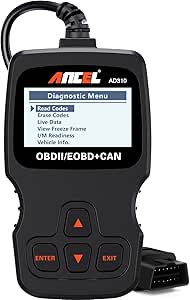 | Best Simple Wired Code Reader | Brand and model: ANCEL AD310 | Weight: 12 oz | Dimensions: 8.9 x 6.9 x 1.4 in | VIEW LATEST PRICE | See Our Full Breakdown |
| Innova 5610 OBD2 Bidirectional Scan Tool |  | Best for Bidirectional Testing | Model: 5610 | Vehicle compatibility: Most 1996–2023 OBD2 vehicles; coverage varies by make and model | Diagnostic systems: Engine, ABS, SRS, and transmission | VIEW LATEST PRICE | See Our Full Breakdown |
| MOTOPOWER MP69033 OBD2 Car Code Reader and Diagnostic Scanner | 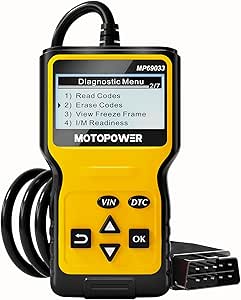 | Best for Straightforward Engine Checks | Model: MP69033 | Display: 2.8-inch LCD with white backlight and contrast adjustment | Supported protocols: 9 OBD II protocols | VIEW LATEST PRICE | See Our Full Breakdown |
| TOPDON AD500 OBD2 Scanner – Engine, ABS, SRS & Transmission Diagnostic Tool |  | Best for Touchscreen Multi-System Diagnostics | Model: ArtiDiag500 | Diagnostic systems: Engine, transmission, ABS, and SRS | Reset functions: Oil, SAS, TPMS, BMS, EPB, and throttle adaptation | VIEW LATEST PRICE | See Our Full Breakdown |
| BluSon YM319 OBD2 Scanner with Battery Tester |  | Best for Engine Codes and Battery Checks | Model: YM319 | Display: 2.4-inch HD color screen | Fault code database: Over 63,000 codes | VIEW LATEST PRICE | See Our Full Breakdown |
| BLCKTEC 460T OBD2 Scanner with All-System Diagnostics and 12+ Reset Services |  | Best for Broad Service Functions | Diagnostic systems: Engine, transmission, ABS, and SRS | OBD2 modes: Supports all 10 OBD2 modes | Data functions: Reads and clears codes; live and freeze-frame data; graphing, recording, and replay | VIEW LATEST PRICE | See Our Full Breakdown |
| FOXWELL NT301 OBD2 Scanner with Live Data |  | Best for Live Engine Data | Brand and model: FOXWELL NT301 | Screen: 2.8-inch color screen | Supported protocols: KWP2000, J1850 VPW, ISO9141, J1850 PWM, CAN | VIEW LATEST PRICE | See Our Full Breakdown |
| Innova 5210 OBD2 Scanner and Engine Code Reader with Battery Testing |  | Best for Battery and Engine Checks | Brand and model: Innova 5210 | Vehicle compatibility: Most U.S., Asian, and European vehicles from 1996 onward; verify feature coverage | Functions: Engine and supported ABS codes, battery and alternator tests, live data, oil reset, emissions readiness | VIEW LATEST PRICE | See Our Full Breakdown |
| BlueDriver Pro Bluetooth OBD2 Scanner |  | Best for Phone-Based Repair Reports | Connection: Bluetooth | Supported devices: Phones and tablets | Vehicle compatibility: Gas vehicles from 1996 onward, plus select light-duty trucks and diesels | VIEW LATEST PRICE | See Our Full Breakdown |
| ANCEL AD410 OBD2 Code Reader and Diagnostic Scanner |  | Best for Simple Engine and Emissions Checks | Brand and model: ANCEL AD410 | Display: 2.4-inch color display | Vehicle compatibility: Most U.S. OBD2 vehicles from 1996 onward; many EU and Asian vehicles from 2000 onward | VIEW LATEST PRICE | See Our Full Breakdown |
| VDIAGTOOL VD10 OBD2 Scanner – Check Engine Code Reader & Car Diagnostic Tool |  | Best Compact Basic Code Reader | Brand and model: VDIAGTOOL VD10-NEW | Part number: VDT-VD10-N | Vehicle compatibility: Claimed 99% of OBDII-compliant vehicles: post-1996 U.S., post-2006 EU, post-2009 Asian | VIEW LATEST PRICE | See Our Full Breakdown |
| OBD2 diagnostic scanner | Vehicle compatibility |
|---|---|
| TOPDON AD600S OBD2 Scanner for | — |
| FOXWELL NT604 Elite OBD2 Scann | — |
| V011 Bluetooth OBD2 Scanner fo | — |
| BlueDriver OBD2 Scanner Blueto | Gas-powered vehicles from 1996 onward in the U.S., Canada, and Mexico |
| ANCEL AD310 OBD-II Code Reader | — |
| Innova 5610 OBD2 Bidirectional | Most 1996–2023 OBD2 vehicles; coverage varies by make and model |
| MOTOPOWER MP69033 OBD2 Car Cod | — |
| TOPDON AD500 OBD2 Scanner | — |
| BluSon YM319 OBD2 Scanner with | Most 1996-and-newer US vehicles and 2000-and-newer EU and Asian vehicles |
| BLCKTEC 460T OBD2 Scanner with | OBD2-compliant vehicles from 1996 onward; feature availability varies |
| FOXWELL NT301 OBD2 Scanner wit | Most 1996+ U.S. gasoline vehicles; many 2000+ European and Asian models |
| Innova 5210 OBD2 Scanner and E | Most U.S., Asian, and European vehicles from 1996 onward; verify feature coverage |
| BlueDriver Pro Bluetooth OBD2 | Gas vehicles from 1996 onward, plus select light-duty trucks and diesels |
| ANCEL AD410 OBD2 Code Reader a | Most U.S. OBD2 vehicles from 1996 onward; many EU and Asian vehicles from 2000 onward |
| VDIAGTOOL VD10 OBD2 Scanner | Claimed 99% of OBDII-compliant vehicles: post-1996 U.S., post-2006 EU, post-2009 Asian |
More Details on Our Top Picks
TOPDON AD600S OBD2 Scanner for Engine, ABS, Transmission, and SRS Diagnostics
The TOPDON AD600S is a strong fit for owners who want to look beyond check-engine faults: it scans engine, ABS, transmission, and SRS systems and adds nine free service functions. Compared with the FOXWELL NT604 Elite, it offers more maintenance functions and CAN-FD support, which may suit newer vehicles, though vehicle-specific support still varies. Its 5-inch touchscreen, live data, AutoVIN, and saved reports give owners more room to investigate and document issues than the simpler ANCEL AD310, which focuses on emissions-related engine diagnostics. The tradeoff is a more involved setup: initial setup requires Wi-Fi, and the scanner needs weekly charging during storage to help protect battery health. I’d choose it for wider system coverage, after checking that its service functions match the vehicle.
Pros:- Scans engine, ABS, transmission, and SRS systems
- Includes nine free service functions and lifetime software updates
- Shows live data and supports saving and sharing diagnostic reports
- Supports CAN-FD and FCA AutoAuth gateway access
Cons:- Supported functions vary by vehicle, year, make, and model
- Wi-Fi is required for initial setup
- Requires weekly charging during storage to help protect battery health
Best for: Owners who want one handheld scanner for engine, ABS, transmission, SRS, and supported maintenance functions across multiple vehicles
Not ideal for: Drivers who want a basic, always-ready code reader with no charging routine or Wi-Fi setup
- Brand and model:TOPDON AD600S
- Display:5-inch touchscreen
- Operating system:Android 11
- Storage:32 GB
- Diagnostic systems:Engine, ABS, transmission, and SRS
- Free service functions:9
- Vehicle coverage:90+ brands; many vehicles from 1996 onward
- Connectivity and access:Wi-Fi; CAN-FD and FCA AutoAuth gateway access
- Warranty:1 year
Our verdict“Choose the AD600S if you want broad handheld diagnostics and service functions, provided its supported features match your vehicle.”
FOXWELL NT604 Elite OBD2 Scanner for ABS, SRS, Engine, and Transmission
The FOXWELL NT604 Elite suits owners who want coverage of four major systems without first setting up software. It arrives with diagnostic and USB cables plus a protective case, and its built-in DTC library, live data, and I/M readiness checks help turn a warning light into a more useful starting point for diagnosis. Like the TOPDON AD600S, it covers engine, ABS, SRS, and transmission; the AD600S pulls ahead for supported service functions, while the FOXWELL keeps its focus on reading and clearing codes. That boundary matters: this tool does not perform oil resets, ABS bleeding, or relearns, and it cannot clear SRS crash data. I’d favor it over the phone-based V011 when I want a dedicated handheld kit, but its compatibility still depends on the vehicle.
Pros:- Scans engine, ABS, SRS, and transmission systems
- Includes diagnostic and USB cables and a protective case
- Offers live data, I/M readiness, and a built-in DTC library
- Lifetime software updates are included
Cons:- Does not provide maintenance or relearn functions such as oil reset or ABS bleeding
- Cannot clear SRS crash or collision data
- Vehicle compatibility varies by make, model, and year
Best for: Drivers who want a dedicated scanner for four-system code checks and live data, ready to use out of the box
Not ideal for: DIY owners who need maintenance resets, ABS bleeding, relearns, or SRS crash-data clearing
- Brand and model:FOXWELL NT604 Elite
- Diagnostic systems:Engine, ABS, SRS, and transmission
- Vehicle coverage:60+ car brands
- Live data:Live data stream, playback, and printing
- Readiness checks:I/M readiness
- Code reference:Built-in DTC library
- Included components:Diagnostic cable, USB cable, quick start guide, protective case, and user manual
- Software updates:Lifetime updates; no extra software fee
Our verdict“Pick the NT604 Elite for a ready-to-use four-system code scanner, but choose the AD600S if service functions are a priority.”
V011 Bluetooth OBD2 Scanner for iOS and Android
The V011 is a practical entry point for drivers who would rather read vehicle data on a phone than use a dedicated screen. Its Bluetooth 5.4 link and OBD Home app provide code reading, live data charts, emissions readiness, VIN, and freeze-frame information. That makes it more approachable for casual checks than the wired ANCEL AD310, while the AD310 avoids app pairing and draws power directly from the vehicle. The V011’s app also supports multiple languages, but the phone connection is part of every session: the vehicle must be on, Bluetooth enabled, and the app connected. iPhone users should connect through the app rather than phone settings. Compared with BlueDriver, the V011’s listed feature set is more centered on general OBD2 data than manufacturer-specific repair reports. It’s best for basic smartphone diagnostics, with compatibility confirmed first.
Pros:- Works with iOS and Android through the OBD Home app
- Displays live sensor data as charts
- Reads and clears codes and retrieves VIN and freeze-frame data
- Supports multiple languages and includes email troubleshooting assistance
Cons:- Requires the vehicle to be powered on with Bluetooth enabled and the app connected
- iPhone users should connect through the app rather than phone settings
- A code may not clear until the underlying fault has been repaired
Best for: Smartphone users who want wireless access to engine codes, readiness status, and live sensor charts for a compatible vehicle
Not ideal for: Drivers who want a standalone scanner, dislike app-based pairing, or need wider system diagnostics such as ABS or SRS
- Model:V011
- Connectivity:Bluetooth 5.4
- Phone compatibility:iOS and Android
- Vehicle coverage:Vehicles from 1996 onward; supports over 96% of makes and models
- Protocols:9
- Diagnostic features:Reads and clears DTCs, checks emissions readiness, resets monitors, displays live data, retrieves VIN and freeze-frame data
- App:OBD Home
- App languages:English, German, Spanish, Finnish, French, Italian, Dutch, Portuguese, and Chinese
Our verdict“Choose the V011 for app-based engine diagnostics and live charts if you’re comfortable relying on your phone for every scan.”
BlueDriver OBD2 Scanner Bluetooth – No Subscription – ABS, SRS, TPMS
BlueDriver Pro stands apart for owners who want more than a code number: its app pairs live data with technician-verified repair reports and supports several systems, including ABS, SRS, TPMS, and transmission. Compared with the V011, which emphasizes general OBD2 data and charts, BlueDriver offers a stronger repair-guidance angle. It also covers more systems than the ANCEL AD310, whose diagnostics are limited to emission-related engine issues. The wireless format keeps the setup compact, and the app has free updates with no subscription requirement. The limits are substantial for some garages: it needs a compatible phone or tablet and supports gas-powered vehicles only, excluding diesel, hybrid, and electric models. Its stated compatibility is also tied to vehicles from 1996 onward in the U.S., Canada, and Mexico.
Pros:- Provides repair reports alongside live data
- Reads and clears supported codes across engine, ABS, SRS, TPMS, and transmission systems
- No subscription is required and app updates are free
- Bluetooth connection avoids a cable running to the phone
Cons:- Requires a compatible smartphone or tablet to operate
- Limited to gas-powered vehicles
- Vehicle coverage is stated for the U.S., Canada, and Mexico
Best for: Owners of supported gas-powered vehicles who want smartphone diagnostics paired with repair reports and live data
Not ideal for: Diesel, hybrid, or electric vehicle owners, and anyone seeking a standalone handheld scanner
- Product:BlueDriver Pro
- Connectivity:Bluetooth
- Vehicle compatibility:Gas-powered vehicles from 1996 onward in the U.S., Canada, and Mexico
- Supported systems:Check Engine, ABS, SRS, TPMS, transmission, Mode 6, and Freeze Frame
- Repair information:Technician-verified repair reports
- Subscription:No subscription required
- App updates:Free
Our verdict“Choose BlueDriver if your gas-powered vehicle is supported and you want repair guidance on your phone rather than a basic code reader.”
ANCEL AD310 OBD-II Code Reader and Engine Diagnostic Scanner
The ANCEL AD310 makes sense for drivers who want a straightforward tool for emission-related engine faults, readiness checks, and basic data without relying on a phone. It draws power from the vehicle’s OBD-II connector, so there is no battery or charger routine; that is simpler than the TOPDON AD600S, though the AD600S covers ABS, SRS, transmission, and service functions the AD310 cannot reach. The AD310 also shows live data and freeze-frame information, which can help put an engine code in context before a repair. Its 2.5-foot cable and compact form keep the reader manageable, but it remains limited to OBD-II vehicles and does not diagnose non-emission systems. Compared with the V011, it trades wireless charts for a direct wired connection and a more self-contained basic scan.
Pros:- Reads and clears emission-related engine trouble codes
- Displays live data, freeze-frame information, and I/M readiness
- Uses vehicle power, so no batteries or charger are needed
- Supports major OBD-II protocols
Cons:- Limited to emission-related diagnostics
- Does not diagnose ABS, SRS, transmission, or other non-emission systems
- Does not work with OBD-I vehicles
Best for: Drivers who want an uncomplicated wired reader for engine warning codes and emissions readiness on a compatible OBD-II vehicle
Not ideal for: Owners who need ABS, SRS, transmission, service functions, or diagnostics for OBD-I vehicles
- Brand and model:ANCEL AD310
- Weight:12 oz
- Dimensions:8.9 x 6.9 x 1.4 in
- Cable length:2.5 ft
- Supported protocols:KWP2000, J1850 VPW, ISO9141, J1850 PWM, and CAN
- Power source:Vehicle OBD-II data link connector
- Diagnostics:Emission-related issues only
- Vehicle coverage:Many 1996-and-newer U.S. vehicles and 2000-and-newer EU and Asian vehicles; compatibility varies
Our verdict“Pick the AD310 for simple wired engine-code checks, and step up to a multisystem scanner if you need ABS or SRS diagnostics.”
Innova 5610 OBD2 Bidirectional Scan Tool
The Innova 5610 is the strongest fit here for owners or repairers who need to do more than read a warning light. Its bidirectional controls let users command supported vehicle functions during troubleshooting, while live data reaches the engine, ABS, SRS, and transmission systems. Compared with the MOTOPOWER MP69033, which focuses on basic engine codes, the 5610 offers a much wider diagnostic and repair toolkit. The tradeoff is that bidirectional and special functions depend on the vehicle, so its broad coverage does not promise the same access on every car. Its free updates and multilingual support add practical value over time, but buyers seeking a simple engine-only reader may find the MOTOPOWER easier to use and more focused.
Pros:- Bidirectional controls support active tests on compatible vehicles
- Live data covers engine, ABS, SRS, and transmission
- Special reset and relearn functions support repair procedures
- Free updates and multilingual support
Cons:- Vehicle coverage and features vary by make and model
- Broader functions may be unnecessary for basic engine-code checks
Best for: Home mechanics and independent repairers who want bidirectional tests and access to several vehicle systems
Not ideal for: Drivers who only need to read check-engine codes or whose vehicle-specific functions are not confirmed
- Model:5610
- Vehicle compatibility:Most 1996–2023 OBD2 vehicles; coverage varies by make and model
- Diagnostic systems:Engine, ABS, SRS, and transmission
- Functions:Bidirectional controls, special resets, and relearn functions
- Languages:English, Spanish, and French
- Updates:Free updates; no subscription fees
- Weight:1.3 pounds
- Included components:Code reader with protective boot, manual, OBD2 cable, soft storage pouch, and USB cable
Our verdict“Choose the Innova 5610 if you need active testing and multi-system diagnostics and can confirm its functions for your vehicle.”
MOTOPOWER MP69033 OBD2 Car Code Reader and Diagnostic Scanner
The MOTOPOWER MP69033 keeps its job clear: read and clear engine codes, show live and freeze-frame data, and provide a built-in lookup for trouble codes. That makes it a more approachable choice for routine check-engine questions than the multi-system TOPDON AD500, whose ABS, SRS, transmission, and reset tools offer more reach but also more to learn. The MOTOPOWER’s 2.8-inch backlit display and vehicle-powered operation keep setup simple, while support for nine OBD II protocols broadens its compatibility across many cars. Its limits matter, though: it does not diagnose ABS or airbag faults, and it cannot handle oil service lights. Choose it for engine-focused checks; skip it if you want one scanner to cover several systems or service procedures.
Pros:- Reads and clears engine fault codes
- Shows live data and freeze-frame information
- Built-in DTC lookup library
- Powered through the vehicle’s OBD II port
Cons:- Does not read ABS or airbag codes
- Does not support oil service light systems
Best for: Drivers who want a dedicated, standalone reader for engine codes, readiness checks, and live data
Not ideal for: DIY mechanics who need ABS, airbag, transmission, or oil service diagnostics
- Model:MP69033
- Display:2.8-inch LCD with white backlight and contrast adjustment
- Supported protocols:9 OBD II protocols
- Languages:English, German, Dutch, Spanish, French, and Italian
- Compatibility:Most US cars from 1996 and EU and Asian cars from 2000 with OBD II, including newer OBD II and CAN vehicles
- Functions:Read and clear engine codes, DTC lookup, freeze frame, I/M readiness, vehicle information, live data, and VIN query
- Power source:Vehicle OBD II data link connector
- Cable length:2.5 feet
- Weight:10.2 ounces
Our verdict“Pick the MOTOPOWER for uncomplicated engine diagnostics, but choose a multi-system tool such as the TOPDON AD500 for broader coverage.”
TOPDON AD500 OBD2 Scanner – Engine, ABS, SRS & Transmission Diagnostic Tool
The TOPDON AD500 pairs four-system diagnostics with six reset functions, making it a practical step up from the engine-only MOTOPOWER MP69033 for owners handling broader maintenance. Its 5-inch touchscreen gives live information and menus more room, while the listed 2 GB RAM and 32 GB storage support data handling. The included oil, SAS, TPMS, BMS, EPB, and throttle adaptation resets can reduce the need for a separate tool when those services are supported. Compared with the Innova 5610, the AD500 emphasizes a large touch interface and reset coverage; the Innova adds bidirectional controls. The TOPDON’s larger body is less convenient to store or hold in tight spaces, and its wider feature set may take time for a first-time user to learn.
Pros:- Diagnostics for engine, transmission, ABS, and SRS
- Six reset functions cover common maintenance tasks
- Large 5-inch touchscreen
- Listed support for over 67 car brands and 10,000 models
Cons:- Relatively bulky for storage and use in confined spaces
- Advanced features may take time for new users to learn
Best for: DIY owners who want a large touchscreen, four-system diagnostics, and common reset functions in one handheld scanner
Not ideal for: Drivers seeking a compact, simple code reader or mechanics who specifically need bidirectional controls
- Model:ArtiDiag500
- Diagnostic systems:Engine, transmission, ABS, and SRS
- Reset functions:Oil, SAS, TPMS, BMS, EPB, and throttle adaptation
- Screen:5-inch touchscreen
- Memory:2 GB RAM and 32 GB storage
- Battery:3350 mAh
- Vehicle coverage:Over 67 car brands and 10,000 models worldwide
- Weight:1.2 pounds
- Warranty:1 year
Our verdict“Choose the AD500 for touchscreen access to four systems and common resets, while the Innova 5610 is the better match for bidirectional testing.”
BluSon YM319 OBD2 Scanner with Battery Tester
The BluSon YM319 adds a one-click battery health check to the familiar set of engine-code tools, live data, freeze-frame records, I/M readiness, and O2 sensor checks. That pairing gives it a distinct use case: a driver can investigate an engine warning and check battery condition with the same plug-in reader. Its color screen and shortcut keys make those routine tasks more accessible than a bare-bones reader such as the MOTOPOWER MP69033, though the MOTOPOWER lists a larger display and wider language detail. The YM319 also supports cloud diagnostic reports, which can help organize information for follow-up. Its scope stops at engine diagnostics, with no ABS, SRS, or transmission coverage, and it excludes hybrid and new energy vehicles. Buyers needing multi-system access should look to the TOPDON AD500 instead.
Pros:- Checks battery health alongside engine diagnostics
- Displays live and freeze-frame data
- Supports cloud diagnostic reports and live data recording
- Color screen and customizable shortcut keys
Cons:- Does not support hybrid or new energy vehicles
- Limited to engine diagnostics, with no ABS, SRS, or transmission support
Best for: Owners of conventional cars who want engine diagnostics plus a quick battery health check
Not ideal for: Hybrid or new energy vehicle owners and drivers who need ABS, SRS, or transmission diagnostics
- Model:YM319
- Display:2.4-inch HD color screen
- Fault code database:Over 63,000 codes
- Supported protocols:KWP2000, J1850 VPW, ISO9141, J1850 PWM, and CAN
- Vehicle compatibility:Most 1996-and-newer US vehicles and 2000-and-newer EU and Asian vehicles
- Languages:13
- Power:Plug-in; no batteries required
- Warranty:1 year
- Diagnostic scope:Engine codes, live and freeze-frame data, I/M readiness, O2 sensors, and battery health; no hybrid or new energy vehicle support
Our verdict“The YM319 suits conventional-car owners who want battery and engine checks together, while multi-system work calls for a broader scanner.”
BLCKTEC 460T OBD2 Scanner with All-System Diagnostics and 12+ Reset Services
The BLCKTEC 460T is aimed at owners who want both four-system diagnostics and a long list of service procedures in one scanner. Its 12-plus functions include oil reset, ABS bleeding, EPB reset, battery initialization, DPF reset, and TPMS relearn, giving it broader maintenance reach than the TOPDON AD500 with its six listed resets. It also graphs, records, and replays live data, which can help track a fault as it occurs rather than relying only on stored codes. AutoVIN and free lifetime updates add convenience for supported vehicles. Feature access still varies by vehicle, and the scanner and companion app are limited to the USA and Canada. Compared with the globally listed TOPDON, that regional restriction sharply narrows who should choose this tool.
Pros:- Scans engine, transmission, ABS, and SRS systems
- Includes 12-plus service functions
- Can graph, record, and replay live data
- AutoVIN, RepairSolutions2 app access, and free lifetime updates
Cons:- Service function availability varies by vehicle
- Scanner and companion app are supported only in the USA and Canada
Best for: DIY mechanics in the USA or Canada who want multi-system scans, extensive reset services, and recorded live data
Not ideal for: Drivers outside the USA and Canada or owners who need guaranteed access to every listed function on their vehicle
- Diagnostic systems:Engine, transmission, ABS, and SRS
- OBD2 modes:Supports all 10 OBD2 modes
- Data functions:Reads and clears codes; live and freeze-frame data; graphing, recording, and replay
- Service functions:12+ functions, including oil reset, ABS bleeding, EPB reset, SAS recalibration, DPF reset, throttle relearn, battery reset, and TPMS relearn
- Vehicle compatibility:OBD2-compliant vehicles from 1996 onward; feature availability varies
- Region:USA and Canada
- Updates:Free lifetime updates
- Connectivity:AutoVIN; pairs with RepairSolutions2 app
Our verdict“Choose the 460T for extensive service functions in the USA or Canada; the TOPDON AD500 has a broader stated worldwide reach and a large touchscreen.”
FOXWELL NT301 OBD2 Scanner with Live Data
The FOXWELL NT301 is a strong fit for drivers who want to watch engine sensor readings while investigating a check-engine light. Its live data graphs make changing values easier to follow than a basic code reader, and the I/M readiness, EVAP, and oxygen sensor checks add useful emissions troubleshooting. Compared with the ANCEL AD410, it offers a slightly larger screen and a similar engine-focused scope; neither is intended for ABS, SRS, or transmission diagnosis. The NT301 connects directly to the vehicle and does not require a phone, which keeps basic checks straightforward. Its main limit is that compatibility and available functions vary by vehicle, and clearing a fault code does not fix the cause. Choose it for hands-on engine checks, not broader system coverage.
Pros:- Displays and graphs live sensor data
- Reads and clears engine fault codes
- Includes I/M readiness, EVAP, and oxygen sensor tests
- Color screen and plug-and-play operation
Cons:- Limited to engine and emissions functions
- Compatibility and function coverage vary by vehicle
- Clearing codes does not address the underlying fault
Best for: Drivers who want a dedicated handheld reader with graphable live engine data and emissions checks
Not ideal for: Owners diagnosing ABS, airbag, or transmission faults, or seeking service resets
- Brand and model:FOXWELL NT301
- Screen:2.8-inch color screen
- Supported protocols:KWP2000, J1850 VPW, ISO9141, J1850 PWM, CAN
- Vehicle compatibility:Most 1996+ U.S. gasoline vehicles; many 2000+ European and Asian models
- Functions:Engine codes, live data graphs, I/M readiness, EVAP and oxygen sensor tests
- Included components:Scanner, USB cable, quick reference guide
- Weight:0.16 kg
- Warranty:12 months
Our verdict“Choose the NT301 if you want a straightforward handheld tool for engine codes and live sensor graphs.”
Innova 5210 OBD2 Scanner and Engine Code Reader with Battery Testing
The Innova 5210 pairs engine diagnostics with battery and alternator testing, making it useful when a warning light and starting trouble might share the same visit to the driveway. It also reads and clears ABS codes on supported vehicles, displays live data, checks emissions readiness, and offers an oil light reset. That gives it a wider practical role than the engine-only FOXWELL NT301, though ABS and other functions depend on the vehicle. Its RepairSolutions2 app adds repair guidance, but buyers need a phone to use that part of the package. The added range suits owners who want one tool for routine checks; drivers focused on wireless, VIN-matched reports may prefer the BlueDriver Pro. Verify feature coverage for your make and model before relying on ABS support.
Pros:- Combines engine diagnostics with battery and alternator testing
- Reads live data and checks emissions readiness
- Offers oil light reset and ABS code support on compatible vehicles
- Repair guidance is available through the RepairSolutions2 app
Cons:- Feature coverage varies by vehicle year, make, and model
- ABS support is not universal
- App guidance requires a compatible phone
Best for: DIY owners who want to check engine faults, battery and alternator condition, and supported ABS codes with one reader
Not ideal for: Drivers who want phone-free operation or need confirmed ABS coverage across a specific vehicle
- Brand and model:Innova 5210
- Vehicle compatibility:Most U.S., Asian, and European vehicles from 1996 onward; verify feature coverage
- Functions:Engine and supported ABS codes, battery and alternator tests, live data, oil reset, emissions readiness
- App:RepairSolutions2 for iPhone and Android
- Connection:Code reader with attached OBD2 cable
- Included components:Code reader with attached OBD2 cable, quick start guide
- Subscriptions:No extra fees or hidden subscriptions stated
- UPC:042173052103
Our verdict“Pick the Innova 5210 if battery and alternator checks matter alongside routine engine diagnostics.”
BlueDriver Pro Bluetooth OBD2 Scanner
The BlueDriver Pro suits owners who would rather read diagnostics on a phone or tablet than use a small handheld screen. Its VIN-matched repair reports add context to code results, while live data, freeze frames, smog readiness, and Mode 6 results give curious DIYers more to work with than a basic engine reader such as the ANCEL AD410. On supported vehicles, its coverage can extend to ABS, SRS, TPMS, and transmission systems, though the available systems vary by vehicle. The Bluetooth connection means there is no cable running to a handheld display, but it also makes a compatible mobile device necessary. Free app updates and no subscription fees are useful for ongoing ownership. Choose this for phone-centered diagnostics; skip it if you want an independent screen or need guaranteed coverage for a particular system.
Pros:- Provides VIN-matched repair reports
- Displays live data, freeze frames, smog readiness, and Mode 6 results
- Can access multiple systems on supported vehicles
- Includes free app updates and no subscription fees
Cons:- Requires a compatible phone or tablet
- Enhanced diagnostic coverage depends on vehicle compatibility
- No standalone screen for viewing results
Best for: DIY owners comfortable using a phone who want code reports and broader supported-system diagnostics
Not ideal for: Drivers without a compatible phone or tablet, or buyers who need confirmed coverage for a specific vehicle system
- Connection:Bluetooth
- Supported devices:Phones and tablets
- Vehicle compatibility:Gas vehicles from 1996 onward, plus select light-duty trucks and diesels
- Diagnostic coverage:Check Engine, ABS, SRS/Airbag, TPMS, Transmission, and more on supported vehicles
- Data and tests:Live data, freeze frames, smog readiness, and Mode 6 results
- Repair reports:Technician-verified reports matched to the vehicle VIN
- Subscription:None
- Support:24/7 North American support
Our verdict“Choose BlueDriver Pro if you want phone-based diagnostics with repair reports and supported system coverage.”
ANCEL AD410 OBD2 Code Reader and Diagnostic Scanner
The ANCEL AD410 keeps the job focused: read engine codes, view live data, and run common emissions checks from a handheld screen. Its freeze-frame, I/M readiness, O2 sensor, and EVAP functions help owners investigate a warning light without installing an app or pairing Bluetooth. Compared with the FOXWELL NT301, it has a smaller display and overlapping engine-focused coverage, so the choice comes down to the specific screen and feature needs rather than broad system diagnostics. The AD410 does not cover ABS, SRS, or transmission faults, and it cannot perform bidirectional controls or service resets. That narrower scope is a sensible fit for routine engine checks, but it will not replace a multi-system tool such as the BlueDriver Pro when supported non-engine systems need attention.
Pros:- Reads and clears engine codes with code definitions
- Provides live data and freeze-frame information
- Supports I/M readiness, O2 sensor, and EVAP tests
- Uses the vehicle port for power and needs no phone pairing
Cons:- Does not diagnose ABS, SRS, or transmission systems
- No bidirectional control or service reset functions
- Vehicle compatibility should be checked before purchase
Best for: Drivers who want a basic handheld reader for engine codes, live data, and emissions checks without using a phone
Not ideal for: Owners who need ABS, SRS, transmission diagnostics, bidirectional controls, or service resets
- Brand and model:ANCEL AD410
- Display:2.4-inch color display
- Vehicle compatibility:Most U.S. OBD2 vehicles from 1996 onward; many EU and Asian vehicles from 2000 onward
- Supported protocols:CAN, ISO9141, KWP2000, J1850 VPW, J1850 PWM
- Functions:Engine and emissions codes, live data, freeze frame, I/M readiness, O2 sensor and EVAP tests
- Power:Powered by the vehicle’s OBD2 port
- Included components:AD410 scanner, user manual, USB cable
- Diagnostic limitations:No ABS, SRS, transmission, bidirectional control, or service reset functions
Our verdict“Pick the AD410 for straightforward engine and emissions checks when you do not need other system diagnostics.”
VDIAGTOOL VD10 OBD2 Scanner – Check Engine Code Reader & Car Diagnostic Tool
The VDIAGTOOL VD10 is aimed at drivers who want a direct, handheld way to read engine faults without setting up an app. Its built-in database of more than 3,000 DTC definitions can help explain common codes at the car, while live data and freeze-frame information add clues about the conditions around a fault. Compared with the ANCEL AD410, the VD10 emphasizes portability and broad claimed vehicle compatibility, but its two-line LCD is less suited to scanning detailed data at a glance. Its code database may also miss manufacturer-specific faults, and the supplied compatibility claim does not guarantee every feature on every model. This is a sensible glovebox reader for basic checks; choose the Innova 5210 if battery testing or supported ABS diagnostics matter more than a compact format.
Pros:- Handheld plug-and-play design powered through the OBD2 connection
- Displays live sensor data and freeze-frame information
- Built-in database defines more than 3,000 DTCs
- Supports major OBDII protocols across U.S., European, and Asian vehicles
Cons:- Two-line LCD limits readability for detailed information
- Built-in definitions may omit manufacturer-specific codes
- Broad compatibility claims do not guarantee every function on each vehicle
Best for: Drivers seeking a portable glovebox reader for common engine codes and basic live data
Not ideal for: Owners who need a larger display, manufacturer-specific diagnostics, or multi-system coverage
- Brand and model:VDIAGTOOL VD10-NEW
- Part number:VDT-VD10-N
- Vehicle compatibility:Claimed 99% of OBDII-compliant vehicles: post-1996 U.S., post-2006 EU, post-2009 Asian
- Supported protocols:CAN, ISO9141, KWP2000, J1850 PWM, J1850 VPW
- Functions:Reads and clears trouble codes, live data, freeze-frame information
- Code definitions:Built-in database of more than 3,000 DTC definitions
- Included components:OBDII connector cable, user manual, VD10 scanner
- Warranty:3-year warranty
Our verdict“Choose the VD10 as a compact basic reader for common engine codes when screen detail is not a priority.”

How We Picked
I compared these scanners by the questions they can help a buyer answer: whether a warning is engine-related or tied to another system, how clearly they present codes and live data, and whether they add functions such as battery checks, resets, or bidirectional controls. I also weighed the practical differences between a standalone handheld reader and a Bluetooth tool that relies on an app. Broader system coverage ranked ahead of basic code reading for buyers seeking a diagnostic scanner, while straightforward controls and focused use cases still mattered for entry-level picks.
The order reflects the balance of diagnostic reach, usability, and fit for the intended buyer, rather than a claim that every listed function works on every vehicle. Advanced features and system access can vary by year, make, model, and software support, so buyers should confirm compatibility before choosing. A simpler tool can be the better pick for occasional check-engine checks; a more capable scanner earns its place when its extra functions match the vehicle and the work the owner plans to do.
Factors to Consider When Choosing OBD2 Diagnostic Scanners
Choose an OBD2 scanner by starting with the problem you want to solve and the vehicle you need to scan. The feature count alone can be misleading: coverage, access, and ease of interpreting results shape whether a tool is useful in your garage.
Match System Coverage to the Warning
A check-engine light usually points buyers toward engine diagnostics, but ABS, airbag, and transmission warnings call for access to those systems. A scanner that advertises multiple systems may still support different functions across different vehicles. Check the exact year, make, and model against the maker’s compatibility information before buying. Do not assume an engine code reader can retrieve an airbag code just because both use the OBD2 port. If you only plan to investigate engine warnings, paying for broad coverage may add little value. For a household with several vehicles, wider coverage can be more useful, provided each vehicle is supported.
Separate Reading Codes From Fixing Problems
A scanner can help identify a fault, but a code is a clue rather than a complete diagnosis. Live data can show readings as the engine runs, which may help distinguish a current condition from an old or intermittent code. Bidirectional controls go further by letting a supported tool command certain components, but they do not repair a fault or replace safe diagnostic procedures. Reset and relearn functions also have specific uses and should not be treated as universal shortcuts. Consider which tasks you can actually perform before paying for advanced controls. If your goal is only to read and clear an occasional engine code, a basic reader may be enough.
Choose Between a Handheld Tool and a Phone App
A dedicated handheld scanner is ready to use without pairing a phone, and its screen and buttons can be convenient in a garage. Bluetooth models can make reports and data easier to view on a phone, but they add dependence on app availability, device compatibility, and a charged phone. Consider who will use the tool and where: a shared household tool may benefit from standalone operation, while a phone-centered workflow may suit someone who wants to save or review scan results. Check whether the app requires an account or subscription and what functions are included. A wireless connection is not automatically more capable than a wired scanner. Prioritize the interface you will find easiest to use when a warning appears.
Look Beyond the Code Number
Code definitions are useful, but clear explanations and access to relevant live data can make the next step easier to decide. Some tools focus on a quick code and definition; others give more context across systems or display changing sensor readings. A long feature list does not guarantee that the information will be easy to interpret. Beginners may prefer simple navigation and plain-language results, while experienced DIY owners may value data views and active controls. Think about whether you want a first clue, help narrowing down a fault, or support for a repair workflow. The more complicated the information, the more important a readable interface becomes.
Treat Compatibility as Vehicle-Specific
OBD2 compliance does not mean every scanner can access every vehicle system or perform every service function. Support can vary by model year, manufacturer, and the specific control module involved. Before purchase, confirm the functions you need for the exact vehicle rather than relying on a general claim such as all-system or reset support. This matters especially for ABS and SRS access, battery registration, and service resets. If you own more than one make, check each vehicle separately. When compatibility details are unclear, contact the manufacturer with the vehicle identification details and the exact function you need.
Decide Whether Special Features Earn Their Keep
Battery testing can be handy for separating a weak battery from an engine fault, while reset services may support recurring maintenance tasks. Those features are most useful when they fit your actual vehicle and routine; otherwise, they add complexity without changing your decision. Buyers who only scan after a warning light appears may get more use from dependable code access and clear explanations. DIY owners who maintain several systems may benefit from broader functions, but should check what each service does and whether it requires additional steps. Avoid choosing by the largest advertised function count alone. Favor a short list of confirmed, useful functions over features you are unlikely to use.
Frequently Asked Questions
Can one OBD2 scanner diagnose ABS and airbag warnings as well as the check-engine light?
Some scanners support engine, ABS, and SRS diagnostics, but basic code readers often focus on engine and emissions codes. Even a multi-system model may have limited access on a particular vehicle. Check the exact vehicle compatibility list and confirm that it covers the system causing the warning. If the warning concerns airbags or brakes, use the scanner as an aid to diagnosis and have safety-related faults inspected by a qualified technician.
Should I buy a Bluetooth scanner or a handheld model?
A Bluetooth scanner can make it convenient to view data and reports on a phone, while a handheld tool works independently of a mobile device. Think about whether you want to keep scan history, share results, or use a dedicated screen in the garage. App support and phone compatibility are part of the product, so check them before choosing a wireless model. For a shared tool or occasional quick checks, a handheld design may be simpler; for a phone-based workflow, Bluetooth may suit you better.
Will an OBD2 scanner tell me exactly what part to replace?
No. A diagnostic trouble code identifies a condition or circuit the vehicle detected, not always the failed part. Live data and system-specific information can help narrow the cause, but symptoms, wiring, connectors, and related components may also need inspection. Replacing parts based on a code name alone can waste time and money. Treat the result as a starting point for diagnosis, especially when the warning involves braking, steering, or airbag systems.
Are reset and bidirectional functions worth paying for?
They can be useful if you perform supported maintenance or want to test certain components through scanner commands. Their value depends on the vehicles you own and the tasks you can safely carry out. A reset function does not fix the underlying cause of a warning, and bidirectional commands should be used with care and the right service information. If your needs stop at reading engine codes, these extras may not justify choosing a more advanced tool. Verify vehicle support for each specific function before buying.
Can I use the same OBD2 scanner with multiple cars?
Often, but the functions available can differ from one car to another. A scanner may read engine codes on several vehicles while offering ABS, SRS, or service functions on only some of them. Check each make, model, and year against the scanner’s compatibility details, particularly if your cars are from different manufacturers. Also check whether the tool needs software updates or app support to access its features. For a mixed vehicle household, broad confirmed compatibility matters more than the scanner’s headline feature count.
Conclusion
For the broadest troubleshooting role in this group, I’d choose the Innova 5610 as best overall, especially if bidirectional controls match your repair plans and vehicle. The ANCEL AD310 is a sensible value choice for basic engine-code reading, while the TOPDON AD600S suits buyers who want a handheld tool with multi-system coverage. For beginners, I’d start with the FOXWELL NT301 if live data is useful, or a simpler reader if code checks are all you need. Choose BlueDriver for an app-based experience without a subscription, the BLCKTEC 460T when its reset services fit your maintenance tasks, and the BluSon YM319 or Innova 5210 if battery testing is a priority. Before deciding, confirm the functions you need for your exact vehicle.
Halloween Picks
halloween
As an affiliate, we earn on qualifying purchases.