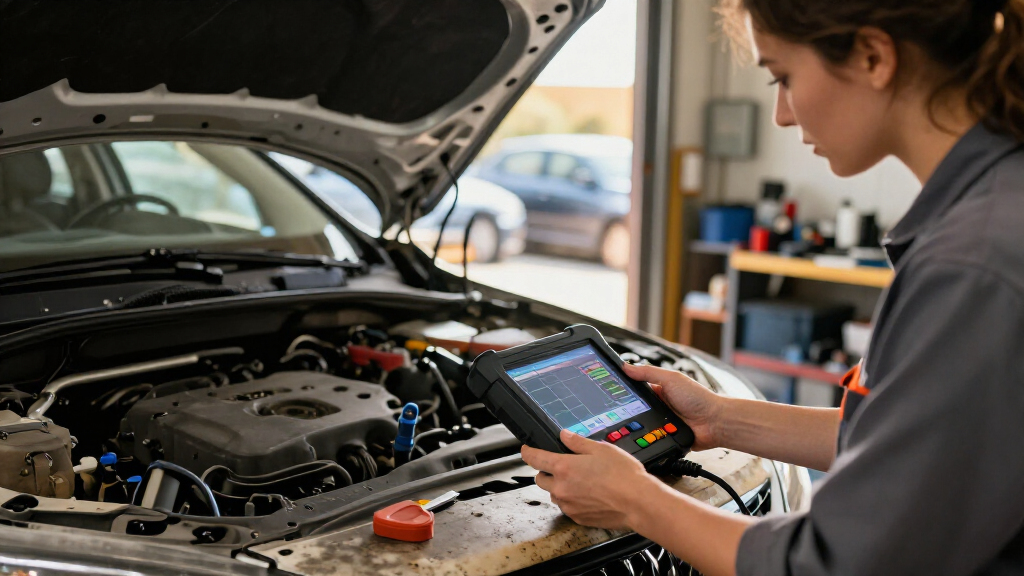

Automotive diagnostic scan tools range from simple check-engine readers to bidirectional devices that can run active tests and access multiple vehicle systems. I name the MUCAR 632 Elite the best overall pick for its AI-assisted features and bidirectional focus, while the Autel MaxiCOM MK808S stands out for broad workshop-style diagnostics and the BlueDriver for a phone-based, subscription-free approach. The main tradeoff is between affordable code reading and paying for deeper system access, service functions, and active testing. Vehicle compatibility and the functions supported on your specific year, make, and model matter as much as the scanner’s feature list. Read on for the full breakdown and guidance on choosing the right level of capability.

Get business pricing on garage and car supplies
- Business-only prices and quantity discounts
- Tax-exempt purchasing
- Multiple users, one account, clear invoices
Complete the kit


Key Takeaways
- Bidirectional control separates the advanced picks: MUCAR 632 Elite, TOPDON ONE, and Innova 5610 are aimed at users who need more than reading and clearing codes.
- System coverage varies more than the phrase “OBD2 scanner” suggests: basic engine readers such as the ANCEL AD310 are not substitutes for tools that access ABS, SRS, or transmission modules.
- Phone-based convenience comes with a different workflow: BlueDriver pairs a Bluetooth adapter with an app, while the FOXWELL NT301 and ANCEL AD310 use dedicated screens and wired connections.
- Higher capability can mean more setup and compatibility checks: tablet-style tools such as the Autel MK808S and TOPDON ONE suit broader diagnostic work, but buyers should verify supported functions for their vehicles before choosing.
- The two BlueDriver entries serve the same general use case: both emphasize Bluetooth diagnostics without a subscription, so buyers should compare the exact listing and included support rather than assume a different role.
| MUCAR 632 Elite AI-Assisted Bidirectional OBD2 Scanner | 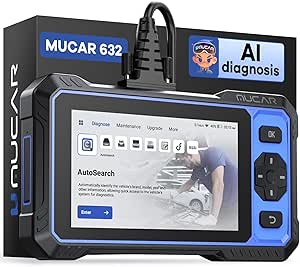 | Best for AI-Assisted Diagnostics | Display: 6.2-inch touchscreen, 1024 × 600 | Storage: 32GB, expandable to 128GB via TF card | Processor: 1.8GHz chip | VIEW LATEST PRICE | See Our Full Breakdown |
| Autel MaxiCOM MK808S Diagnostic Scanner |  | Best for Broad Vehicle Coverage | Vehicle compatibility: More than 200 vehicle brands | Active tests: More than 3,000 | Display: 7-inch touchscreen | VIEW LATEST PRICE | See Our Full Breakdown |
| FOXWELL NT301 OBD2 Scanner Live Data Diagnostic Code Reader Tool for Check Engine Light |  | Best for Simple Check-Engine Diagnostics | Model: NT301 | Weight: 0.16 kg | Display: 2.8-inch color screen | VIEW LATEST PRICE | See Our Full Breakdown |
| TOPDON ONE Bidirectional Scan Tool, 10.1″ Professional Diagnostic Device |  | Best Premium Workshop Platform | Display: 10.1-inch touchscreen | Connectivity: Dual Wi-Fi | Protocols: CAN-FD and DoIP | VIEW LATEST PRICE | See Our Full Breakdown |
| LAUNCH CRP123 Advanced OBD2 Scanner, 8 Reset Scan Tool with Lifetime Free Updates |  | Best for Reset-Service Coverage | Display: 5-inch touchscreen | Storage: 64GB ROM | Battery: 6000mAh | VIEW LATEST PRICE | See Our Full Breakdown |
| BlueDriver OBD2 Scanner Bluetooth, No Subscription, ABS SRS TPMS |  | Best for App-Based Multi-System Diagnostics | Brand: BlueDriver | Model: Pro | Vehicle compatibility: Gas vehicles from 1996 onward and select light-duty trucks | VIEW LATEST PRICE | See Our Full Breakdown |
| Innova 5610 OBD2 Bidirectional Scan Tool |  | Best for Bidirectional DIY Troubleshooting | Brand: Innova | Model: 5610 | Vehicle compatibility: Most 1996–2023 vehicles | VIEW LATEST PRICE | See Our Full Breakdown |
| BlueDriver OBD2 Bluetooth Scanner – No Subscription, ABS, SRS, TPMS |  | Best for Smartphone Repair Reports | Brand: BlueDriver | Model: LSB2 | Vehicle compatibility: Gas-powered vehicles from 1996 onward in North America | VIEW LATEST PRICE | See Our Full Breakdown |
| ANCEL AD310 Classic Enhanced Universal OBD II Scanner Car Engine Fault Code Reader CAN Diagnostic Scan Tool | 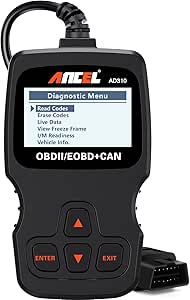 | Best Basic Engine-Code Reader | Brand: ANCEL | Model: AD310 | Vehicle compatibility: 1996-and-newer OBD2 vehicles, including US, EU, and Asian models | VIEW LATEST PRICE | See Our Full Breakdown |
| TOPDON AD600S OBD2 Scanner, Engine, ABS, SRS, Transmission Diagnostic Tool |  | Best Standalone Multi-System Scanner | Display: 5-inch touchscreen | Operating system: Android 11 | Storage: 32GB | VIEW LATEST PRICE | See Our Full Breakdown |
| automotive diagnostic scan tool | Display | Connectivity | Vehicle compatibility | Model |
|---|---|---|---|---|
| MUCAR 632 Elite AI-Assisted Bi | 6.2-inch touchscreen, 1024 × 600 | Wi-Fi and AUTO VIN scanning | — | — |
| Autel MaxiCOM MK808S Diagnosti | 7-inch touchscreen | Wired USB | More than 200 vehicle brands | — |
| FOXWELL NT301 OBD2 Scanner Liv | 2.8-inch color screen | — | — | NT301 |
| TOPDON ONE Bidirectional Scan | 10.1-inch touchscreen | Dual Wi-Fi | — | — |
| LAUNCH CRP123 Advanced OBD2 Sc | 5-inch touchscreen | — | — | — |
| BlueDriver OBD2 Scanner Blueto | — | Bluetooth | Gas vehicles from 1996 onward and select light-duty trucks | Pro |
| Innova 5610 OBD2 Bidirectional | — | — | Most 1996–2023 vehicles | 5610 |
| BlueDriver OBD2 Bluetooth Scan | — | Bluetooth | Gas-powered vehicles from 1996 onward in North America | LSB2 |
| ANCEL AD310 Classic Enhanced U | — | — | 1996-and-newer OBD2 vehicles, including US, EU, and Asian models | AD310 |
| TOPDON AD600S OBD2 Scanner | 5-inch touchscreen | Wi-Fi | — | — |
More Details on Our Top Picks
MUCAR 632 Elite AI-Assisted Bidirectional OBD2 Scanner
The MUCAR 632 Elite is a strong fit for DIYers who want more than engine-code reading: bidirectional controls, ECU coding, and reset services let it support a broader range of repair checks. Its AI-assisted analysis may help make fault information easier to interpret, while AUTO VIN scanning cuts down on manual vehicle selection. Compared with the FOXWELL NT301, this is a much more capable workshop-style tool, not just a check-engine-light reader. It also has an advantage over the Autel MaxiCOM MK808S in listing lifetime free updates, though Autel specifies a wider brand count and active-test total. The tradeoff is that AI analysis needs internet access, and advanced functions can demand repair knowledge. Buyers should check feature compatibility for their exact vehicle before choosing it.
Pros:- Bidirectional control and ECU coding offer capabilities beyond basic code reading.
- AI-assisted fault analysis can help interpret diagnostic information.
- Lifetime free updates avoid a recurring software update fee.
- AUTO VIN scanning speeds vehicle identification.
Cons:- AI-assisted analysis requires an internet connection.
- Advanced functions may be difficult for users without diagnostic experience.
- Vehicle and feature compatibility should be confirmed before purchase.
Best for: DIY mechanics who want bidirectional tests, coding, and guided fault analysis across compatible vehicles.
Not ideal for: Drivers who only need to read and clear engine codes, or buyers who need offline AI analysis or confirmed support for a specific advanced function without checking compatibility.
- Display:6.2-inch touchscreen, 1024 × 600
- Storage:32GB, expandable to 128GB via TF card
- Processor:1.8GHz chip
- Operating system:Android 8.1
- Connectivity:Wi-Fi and AUTO VIN scanning
- Protocols:FCA SGW and CAN FD
- Vehicle coverage:1996 to latest models
- Updates:Lifetime free updates
- Additional functions:Bidirectional control, ECU coding, remote assistance
Our verdict“Choose the MUCAR 632 Elite if you want AI-assisted guidance alongside coding and bidirectional tests, and are comfortable checking vehicle compatibility.”
Autel MaxiCOM MK808S Diagnostic Scanner
The Autel MaxiCOM MK808S is aimed at buyers who need a wide-ranging shop-style scanner, with full-system diagnostics, live data, freeze-frame information, and active tests across more than 200 vehicle brands. Its 7-inch touchscreen gives diagnostic menus and data more room than the compact FOXWELL NT301, while its listed 3,000-plus active tests make it a more capable choice for component checks. The MUCAR 632 Elite lists lifetime updates and ECU coding; Autel instead specifies extensive global coverage and a stable wired connection. That USB connection avoids wireless pairing issues, but it also means less freedom to move around the vehicle. Factor in the annual upgrade fee, and this makes more sense for frequent diagnostic work than occasional check-engine-light checks.
Pros:- Full-system diagnostics include live data and freeze-frame analysis.
- Coverage is listed for more than 200 vehicle brands.
- More than 3,000 active tests support component-level checks.
- Wired USB connectivity provides a direct connection without Bluetooth pairing.
Cons:- Firmware upgrades carry an annual fee.
- USB-only connectivity limits movement around the vehicle.
- Compatibility depends on the vehicle model and year.
Best for: Independent repairers and experienced DIYers who need full-system scans and active tests across a broad range of vehicle brands.
Not ideal for: Casual owners seeking a simple, low-maintenance code reader, or users who want Bluetooth operation and no recurring upgrade fee.
- Vehicle compatibility:More than 200 vehicle brands
- Active tests:More than 3,000
- Display:7-inch touchscreen
- Connectivity:Wired USB
- Operating system:Android-based
- RAM:4GB
- Processor:RK3566
- Languages:21
- Upgrade fee:$124 annually
Our verdict“Pick the MK808S for broad, regular diagnostic work and active testing, but skip it if wireless use or avoiding annual upgrade fees matters more.”
FOXWELL NT301 OBD2 Scanner Live Data Diagnostic Code Reader Tool for Check Engine Light
The FOXWELL NT301 keeps its job focused: read and clear engine fault codes, then use live-data graphing and OBDII modes to help narrow down what is happening. That makes it a practical first step for owners who want useful engine diagnostics without the complexity of coding or bidirectional controls. Compared with the Autel MaxiCOM MK808S and MUCAR 632 Elite, it offers far fewer system-level repair functions, but its compact 2.8-inch color-screen design is easier to keep in a glove box and quicker to pick up for a warning light. Its limits are equally clear: coverage is restricted to OBD2-compatible vehicles, and the feature set may not satisfy professionals or users diagnosing ABS, transmission, or other systems. Choose it for engine checks, not as a shop-wide scanner.
Pros:- Reads and clears engine fault codes without requiring a larger tablet-style scanner.
- Live-data graphing helps users track engine readings.
- Supports multiple listed OBDII protocols.
- Lightweight design and plug-and-play operation suit occasional checks.
Cons:- Limited to OBD2-compatible vehicles and listed engine diagnostics.
- Does not offer the advanced system functions found on the MUCAR 632 Elite or Autel MK808S.
- The 2.8-inch display provides less room for viewing data than larger scan tools.
Best for: Car owners and DIY beginners who want a portable tool for engine codes and live-data checks on a compatible vehicle.
Not ideal for: Professional mechanics or owners who need bidirectional tests, ECU coding, or diagnostics beyond the engine system.
- Model:NT301
- Weight:0.16 kg
- Display:2.8-inch color screen
- Protocols:KWP2000, J1850 VPW, ISO9141, J1850 PWM, CAN
- Compatibility:Most 1996+ gasoline cars, light trucks, and SUVs; many 2000+ European and Asian models
- Included components:OBD2 scanner, USB cable, quick reference guide
- Warranty:12 months
Our verdict“Choose the NT301 for straightforward engine-code and live-data checks, but move up to a full-system scanner if you need broader repair functions.”
TOPDON ONE Bidirectional Scan Tool, 10.1″ Professional Diagnostic Device
TOPDON ONE is the most workshop-oriented option in this group, pairing a 10.1-inch touchscreen with bidirectional control, ECU coding, and topology mapping. The larger display can make network layouts and diagnostic information easier to inspect than on the MUCAR 632 Elite, while dual Wi-Fi supports a more flexible wireless workflow than the USB-only Autel MaxiCOM MK808S. Its protocol support and listed coverage focus on newer model-year ranges for several makes, rather than promising blanket compatibility across every vehicle. That focus, plus subscription-based access to the latest vehicle data after the included bonus year, makes it a less sensible choice for occasional home checks. The advanced functions also suit users comfortable with diagnostic workflows, not someone who only wants to clear a warning light.
Pros:- Large 10.1-inch screen gives more space for diagnostic and topology information.
- Bidirectional control and ECU coding support advanced repair tasks.
- Topology mapping helps visualize vehicle networks.
- Dual Wi-Fi and CAN-FD and DoIP support suit newer diagnostic workflows.
Cons:- Latest vehicle data requires a subscription after the included bonus year.
- Listed model-year coverage varies by make and starts at different years.
- Complex functions may require training and are excessive for basic code reading.
Best for: Professional technicians and advanced DIYers working on supported newer vehicles who can make use of topology mapping, coding, and bidirectional tests.
Not ideal for: Casual owners, buyers with older or unsupported vehicles, and anyone unwilling to manage a subscription for continued access to current vehicle data.
- Display:10.1-inch touchscreen
- Connectivity:Dual Wi-Fi
- Protocols:CAN-FD and DoIP
- Listed vehicle coverage:2013+ BMW; 2016+ VW and Volvo; 2017+ Jaguar; 2018+ Mercedes-Benz; 2020+ GM and Chrysler
- Software updates:One bonus year included; additional year with subscription
- Advanced functions:Bidirectional control, ECU coding, topology mapping, service functions
- Warranty:Included with hardware
Our verdict“Choose TOPDON ONE for advanced work on supported newer vehicles when its large screen and topology tools justify subscription-based data access.”
LAUNCH CRP123 Advanced OBD2 Scanner, 8 Reset Scan Tool with Lifetime Free Updates
The LAUNCH CRP123 is built around a useful middle ground: multi-system diagnostics and eight reset functions add service capability without the professional complexity of the TOPDON ONE’s topology mapping and ECU coding. Its 5-inch touchscreen, Auto VIN, and AutoScan features are geared toward a simpler setup, while lifetime free Wi-Fi updates avoid the annual upgrade charge listed for the Autel MK808S. The stated 1996–2026 coverage and broad brand claim make it appealing to mixed-vehicle households, but actual support still depends on the make, model, and function. Buyers should also note that CANFD and DoIP require a separate adapter, which weakens the appeal for anyone choosing it specifically for those protocols. It is a more service-focused alternative to the basic FOXWELL NT301, but not a guaranteed fit for every advanced task.
Pros:- Eight reset functions extend its usefulness beyond basic engine-code reading.
- Multi-system diagnostics and live data support broader checks than the FOXWELL NT301.
- Lifetime free Wi-Fi updates avoid a stated annual firmware upgrade fee.
- Auto VIN and AutoScan can simplify vehicle setup.
Cons:- CANFD and DoIP require a separate adapter.
- Compatibility varies by vehicle and diagnostic function.
- Some features may require registration or additional fees.
Best for: DIY owners who want multiple reset services, multi-system checks, and ongoing software updates in a touchscreen scanner.
Not ideal for: Users who need CANFD or DoIP out of the box, or professionals requiring confirmed support for a specific advanced function across their vehicle fleet.
- Display:5-inch touchscreen
- Storage:64GB ROM
- Battery:6000mAh
- Protocols:CANFD and DoIP; separate adapter required
- Compatibility:1996–2026 vehicles, 12V only
- Languages:11
- Included components:Diagnostic tool, OBD II cable, charging cable, user manual, carrying bag
- Updates:Lifetime free Wi-Fi updates
- Manufacturer warranty:2 years
Our verdict“Pick the CRP123 if you want reset-service coverage and lifetime updates, but verify your required functions and account for the separate protocol adapter.”
BlueDriver OBD2 Scanner Bluetooth, No Subscription, ABS SRS TPMS
The BlueDriver Pro makes the most sense for drivers who want more than check-engine codes but prefer using a phone over carrying a dedicated scan-tool screen. Its Bluetooth connection and coverage of ABS, SRS, TPMS, and transmission systems can help narrow down problems that a basic engine-code reader such as the ANCEL AD310 cannot access. Technician-verified repair reports and live data add useful context when deciding what to investigate next. A key advantage over some app-connected tools is no subscription fee for its feature access. The tradeoff is that your phone or tablet becomes part of the tool: buyers who want a self-contained handheld device may prefer the TOPDON AD600S. Coverage is also limited to gas vehicles from 1996 onward, and some advanced features may depend on app updates.
Pros:- Accesses diagnostics across engine, ABS, SRS, TPMS, and transmission systems
- Bluetooth connection works with a compatible smartphone or tablet
- No subscription fees for feature access
- Provides live data and technician-verified repair reports
Cons:- Requires a compatible smartphone or tablet to operate
- Limited to gas vehicles from 1996 onward and select light-duty trucks
- Some advanced features may depend on app updates
Best for: Owners of 1996-and-newer gas vehicles who want multi-system diagnostics, live data, and repair guidance through a smartphone app without a subscription.
Not ideal for: Buyers who want a standalone scanner with its own display, or owners of diesel, older, or unsupported vehicles.
- Brand:BlueDriver
- Model:Pro
- Vehicle compatibility:Gas vehicles from 1996 onward and select light-duty trucks
- Connectivity:Bluetooth
- Supported systems:Check engine, ABS, SRS, TPMS, and transmission
- Subscription:No subscription fees
- Warranty:180-day money-back guarantee and 1-year defect replacement
Our verdict“Choose the BlueDriver Pro if you want broad, subscription-free diagnostics through your phone rather than a dedicated handheld scanner.”
Innova 5610 OBD2 Bidirectional Scan Tool
For a capable home mechanic, the Innova 5610’s main distinction is bidirectional control: it can do more than retrieve information, offering advanced functions and reset procedures that help with active troubleshooting. That puts it beyond the ANCEL AD310, which focuses on emission-related engine codes, and gives it a more hands-on role than the phone-dependent BlueDriver Pro. The included cable, protective boot, and pouch suit users who want a physical tool, while RepairSolutions2 app pairing adds wireless functions. Free updates and US-based support are useful for owners working across multiple vehicles. The tradeoff is that advanced controls call for familiarity with vehicle systems, and compatibility is not universal. App features also require internet access, so this is less convenient when working offline or on an unsupported model.
Pros:- Bidirectional controls support active troubleshooting beyond code reading
- Offers reset procedures and real-time data
- Includes OBD2 cable, protective boot, manual, and soft pouch
- Free updates and US-based technical support
Cons:- Not compatible with every make and model
- Some advanced functions require vehicle-system knowledge
- App features require an internet connection
Best for: DIY mechanics who understand basic vehicle systems and want bidirectional controls, reset procedures, and broad coverage for compatible 1996–2023 vehicles.
Not ideal for: First-time users seeking a simple code reader, or owners who need guaranteed compatibility with a specific vehicle before checking support.
- Brand:Innova
- Model:5610
- Vehicle compatibility:Most 1996–2023 vehicles
- Diagnostic functions:Bidirectional controls, real-time data, and reset procedures
- App:RepairSolutions2
- Included components:Code reader with protective boot, manual, OBD2 cable, soft pouch, and USB cable
- Weight:1.3 pounds
- Updates and support:Free updates and US-based technical support
Our verdict“Pick the Innova 5610 if you can use bidirectional controls and want a wired handheld tool with app support for compatible vehicles.”
BlueDriver OBD2 Bluetooth Scanner – No Subscription, ABS, SRS, TPMS
This BlueDriver model is a strong fit for owners who want live data and detailed repair reports alongside expanded diagnostics, without paying a recurring subscription. Like the BlueDriver Pro, it connects over Bluetooth and reaches beyond basic engine codes to systems such as ABS, SRS, TPMS, and transmission. Its stated North American gas-vehicle coverage makes the fit clear, while the ANCEL AD310 is a simpler choice for drivers who only need emission-related code checks. Compared with the handheld TOPDON AD600S, BlueDriver keeps the hardware compact but relies on your phone or tablet for the interface. That means fewer dedicated-device conveniences, and the extra diagnostic information may still take mechanical knowledge to interpret. It is not suited to older, diesel, or non-North-American vehicles outside its stated compatibility.
Pros:- Reads supported engine, ABS, SRS, airbag, TPMS, and transmission systems
- Bluetooth connection pairs with a compatible phone or tablet
- Includes detailed repair reports and live data monitoring
- No subscription required for feature access
Cons:- Requires a compatible smartphone or tablet
- Compatibility is limited to North American gas vehicles from 1996 onward
- Interpreting advanced diagnostics may require vehicle knowledge
Best for: North American gas-car owners who want phone-based live data, expanded system diagnostics, and repair reports without a subscription.
Not ideal for: Drivers who prefer a standalone screen, own a diesel or pre-1996 vehicle, or need coverage outside the stated North American gas-vehicle range.
- Brand:BlueDriver
- Model:LSB2
- Vehicle compatibility:Gas-powered vehicles from 1996 onward in North America
- Connectivity:Bluetooth
- Supported systems:Check engine, ABS, SRS, airbag, TPMS, and transmission
- Weight:2.08 ounces
- Subscription:No subscription required
- Warranty:180-day money-back guarantee and 1-year warranty on defective products
Our verdict“Choose this BlueDriver if phone-based repair reports and multi-system coverage matter more than having a dedicated scanner display.”
ANCEL AD310 Classic Enhanced Universal OBD II Scanner Car Engine Fault Code Reader CAN Diagnostic Scan Tool
The ANCEL AD310 is the straightforward pick for diagnosing emission-related engine faults without pairing a phone or setting up an app. It supports all listed OBDII protocols and works with many 1996-and-newer US, EU, and Asian vehicles, giving it broad basic-code coverage. Its focus is much narrower than either BlueDriver model: it does not reach ABS, SRS, TPMS, or transmission diagnostics, and it lacks repair reports and multi-system data. That simplicity is its appeal for a driver who wants to read and clear an engine code before deciding whether a repair visit is needed. The tradeoff is clear: shoppers who want active controls or deeper system access should move up to the Innova 5610 or TOPDON AD600S. It also cannot diagnose OBDI vehicles.
Pros:- Supports the listed OBDII protocols
- Compatible with many 1996-and-newer US, EU, and Asian vehicles
- Reads and clears emission-related engine fault codes
- Does not require batteries or a charger
Cons:- Cannot read non-emission system fault codes
- Does not support OBDI vehicles
- Limited diagnostic depth compared with multi-system scanners such as the TOPDON AD600S
Best for: Drivers who want a simple, self-contained way to read and clear emission-related engine codes on a compatible 1996-or-newer vehicle.
Not ideal for: DIY mechanics seeking ABS, airbag, transmission, or other non-emission diagnostics, or anyone with an OBDI vehicle.
- Brand:ANCEL
- Model:AD310
- Vehicle compatibility:1996-and-newer OBD2 vehicles, including US, EU, and Asian models
- Protocols supported:KWP2000, J1850 VPW, ISO9141, J1850 PWM, and CAN
- Diagnostic coverage:Emission-related engine faults
- Dimensions:8.9 x 6.9 x 1.4 inches
- Weight:12 ounces
- Included components:OBD2 scanner and user’s manual
Our verdict“Buy the AD310 for basic engine-code checks, but choose a multi-system scanner if you need diagnostics beyond emissions.”
TOPDON AD600S OBD2 Scanner, Engine, ABS, SRS, Transmission Diagnostic Tool
The TOPDON AD600S suits buyers who want a dedicated touchscreen scanner with broader system coverage than a basic code reader. Its 5-inch display, AutoVIN, and live-data viewing keep diagnostics on the tool itself, unlike the BlueDriver models, which depend on a phone or tablet. It covers engine, ABS, SRS, and transmission systems on supported vehicles, making it a more useful home-garage option than the ANCEL AD310 for faults beyond emissions. Lifetime free software updates also support longer-term use. The tradeoff is that feature availability varies by make and model, so buyers should verify coverage for their vehicle before relying on a particular function. Initial setup requires Wi-Fi, which can be inconvenient in a garage without a connection, and its 1996-and-newer coverage excludes older vehicles.
Pros:- Standalone 5-inch touchscreen avoids dependence on a phone
- Supports diagnostics for engine, ABS, SRS, and transmission systems
- Lifetime free software updates
- AutoVIN and live-data viewing support the diagnostic workflow
Cons:- Requires Wi-Fi for initial setup
- Function availability varies by vehicle make and model
- Limited to vehicles from 1996 onward
Best for: Home mechanics who want a standalone touchscreen tool for engine, ABS, SRS, and transmission diagnostics on supported 1996-and-newer vehicles.
Not ideal for: Drivers who need a compact, phone-connected reader, lack Wi-Fi for initial setup, or require functions not supported for their specific vehicle.
- Display:5-inch touchscreen
- Operating system:Android 11
- Storage:32GB
- Connectivity:Wi-Fi
- Supported vehicle years:1996 and newer
- Supported vehicle types:Cars, SUVs, pickups, and minivans
- Diagnostic systems:Engine, ABS, SRS, and transmission
- Weight:630 g
- Warranty:1 year
Our verdict“Choose the AD600S if you want a self-contained, multi-system touchscreen scanner and have confirmed its functions support your vehicle.”

How We Picked
I ranked these automotive diagnostic scan tools by how well their capabilities match distinct buyer needs: code reading, access to systems beyond the engine, live data, service functions, and bidirectional testing. I also weighed usability, connection style, update terms, and the amount of work required to turn a fault code into a useful next step. Compatibility matters throughout this category, so a feature only counts as an advantage when a buyer can confirm it works with their vehicle.
The ranking favors tools that offer a useful balance of diagnostic depth and approachable operation, then separates specialist choices by their strongest use case. The MUCAR 632 Elite leads as a broad, bidirectional option; Autel and TOPDON’s tablet-style devices suit buyers seeking wider diagnostic workflows. BlueDriver earns a distinct place for app-based use, while the FOXWELL and ANCEL models make more sense for simpler engine-code tasks. The duplicate BlueDriver listing is treated as a separate listed product, but its role overlaps with the other BlueDriver entry rather than adding a new capability tier.
| automotive diagnostic scan tool | Connectivity |
|---|---|
| MUCAR 632 Elite AI-Assisted Bi | Wi-Fi and AUTO VIN scanning |
| Autel MaxiCOM MK808S Diagnosti | Wired USB |
| FOXWELL NT301 OBD2 Scanner Liv | — |
| TOPDON ONE Bidirectional Scan | Dual Wi-Fi |
| LAUNCH CRP123 Advanced OBD2 Sc | — |
| BlueDriver OBD2 Scanner Blueto | Bluetooth |
| Innova 5610 OBD2 Bidirectional | — |
| BlueDriver OBD2 Bluetooth Scan | Bluetooth |
| ANCEL AD310 Classic Enhanced U | — |
| TOPDON AD600S OBD2 Scanner | Wi-Fi |
Factors to Consider When Choosing Automotive Diagnostic Scan Tools
Before choosing a scanner, I would start with the repair decisions you expect it to support, not the longest feature list. These differences affect whether a tool can help you investigate a warning, run a service procedure, or actively test a component.
Match system coverage to the warning you need to diagnose
A basic OBD2 reader usually focuses on emissions-related engine codes, while more capable tools may communicate with ABS, SRS, transmission, and other modules. A check-engine light may be all you need to address at home, but an airbag or ABS warning calls for access to the relevant system. Do not assume that a scanner labeled “all-system” supports every module on every vehicle. Manufacturers can restrict functions by model year, trim, or market. Check the tool’s vehicle coverage information against your exact car before buying. If you only need engine codes, paying for additional module access may add complexity without solving a real problem.
Know the difference between reading codes and controlling a test
Code reading tells you what a vehicle has recorded; live data can show how sensors and systems behave; bidirectional control lets a compatible scanner command certain components. Those are different levels of diagnosis, not interchangeable labels for the same feature. Active tests can help narrow a fault, but they do not automatically identify the cause or replace safe repair procedures. Buyers who mainly want to check a warning light can often skip bidirectional capability. A technician or experienced DIYer may value it when supported tests can isolate a system faster. Confirm the specific active tests available for your vehicle rather than relying on the word “bidirectional” alone.
Check service functions separately from diagnostic access
Reset functions such as oil service, battery registration, or electronic parking brake service are often listed as a group, but availability varies by vehicle and tool. A scanner might read a module without supporting its reset procedure. Before paying for a function, identify the maintenance tasks you actually perform and verify each one for your vehicle. Some procedures require additional steps, stable battery voltage, or a compatible replacement part. A long list of resets is less useful than reliable support for the few tasks you need. This check can prevent the common mistake of buying a scanner for one advertised reset that does not apply to your car.
Choose a connection and screen that fit your workflow
Handheld scanners with built-in screens are ready to use without a phone, which can suit quick checks or a shared garage tool. Bluetooth adapters rely on a compatible phone and app, offering a familiar interface but tying diagnosis to that device and software. Tablet-style scanners provide more room for data and menus, yet may take longer to set up and store. Think about where you will use the tool: a compact wired reader is easy to keep in a vehicle, while a larger screen can help when comparing multiple data values. Also check whether the connection requires internet access for the functions you plan to use. The best interface is the one that makes you more likely to interpret results correctly.
Read update and subscription terms before buying
Update policies affect how long a scanner stays useful as vehicle coverage and software change. “Lifetime updates” and “no subscription” describe different arrangements, so confirm what is included, how updates are delivered, and whether any advanced functions require an account or paid service. An update can add coverage, but it cannot guarantee support for every vehicle-specific procedure. If you own one older vehicle and need occasional code checks, ongoing software features may matter less than simple operation. For a newer or mixed vehicle fleet, current compatibility information becomes more valuable. Treat update claims as part of the ownership model, not as proof that every function is available.
Set expectations: a scan result is a starting point
A diagnostic trouble code points to a detected condition or circuit; it does not always identify the failed part. Replacing a component based only on a code can waste time and money, especially when wiring, connectors, or related systems may be involved. Use freeze-frame data and live readings when available, then compare them with reliable repair information. A scanner is also not a substitute for a professional diagnosis when a fault affects braking, steering, airbags, or safe operation. Buyers should choose a tool that fits their ability to interpret results, not just one with the most technical functions. The more advanced the scanner, the more useful it is when paired with sound diagnostic practice.
Frequently Asked Questions
Will an OBD2 scanner read ABS and airbag codes on my car?
Only if the scanner supports those systems for your specific vehicle; a standard engine-code reader may not access ABS or SRS modules. Check compatibility by model year, make, and model, and look for explicit support for the system you need. Even a scanner with broad coverage may offer different functions across vehicles. If an ABS or airbag warning is the reason for your purchase, confirm that exact use case before ordering. Do not rely on the general label “OBD2” as proof of all-system access.
Do I need a bidirectional scan tool for home repairs?
Not for every home repair. A basic reader can be enough to retrieve engine codes and monitor common live data, while bidirectional control matters when you want to command supported components or run active tests. Those tests can help narrow a problem, but they require careful interpretation and may not be available on every vehicle. If your work is limited to checking a warning light, a simpler scanner may be the more practical choice. Choose bidirectional capability when you have a clear need for specific tests, not just because it sounds more advanced.
Should I choose a Bluetooth scanner or a handheld unit?
A Bluetooth scanner can be convenient if you prefer viewing results on a phone and are comfortable using its app. A handheld unit has its own display and can be easier to grab for a quick check without pairing or relying on a phone. Compare the app’s supported functions, phone compatibility, and update terms with the standalone unit’s menus and screen. Also consider whether you will share the scanner with another driver or use it in a garage where a larger display helps. Neither format is automatically more capable; system coverage and vehicle compatibility matter more.
Can a scanner tell me exactly which part to replace?
Usually not. A trouble code describes a detected fault or condition, and several causes can produce the same code. Live data, freeze-frame information, inspection, and vehicle-specific diagnostic procedures help separate a failed part from wiring, connection, or related-system problems. A scanner can make the investigation more informed, but it does not replace diagnosis. For safety-related faults or unclear results, a qualified technician can help confirm the cause before parts are replaced.
Are the two BlueDriver listings meaningfully different?
Based on the supplied product names, both BlueDriver entries describe a Bluetooth OBD2 scanner with no subscription and access to ABS, SRS, and TPMS information. The names do not establish a distinct feature or role for each listing. Compare the exact listing details, included adapter, supported vehicle coverage, and app terms rather than treating the duplicate entries as separate capability levels. If those details match, the choice is between listings of the same general tool rather than two different types of scanner. Confirm current compatibility for your vehicle before deciding.
Conclusion
For the broadest mix of home and advanced diagnostic needs, I recommend the MUCAR 632 Elite as best overall, with the Autel MaxiCOM MK808S as the best premium fit for buyers who want a tablet-style workflow and broad system access. The FOXWELL NT301 is a practical value choice for straightforward engine diagnostics, while the ANCEL AD310 is best for beginners who want a simple wired reader. For phone-based use without a subscription, choose BlueDriver; for bidirectional testing, compare the MUCAR, TOPDON ONE, and Innova 5610 against your vehicle’s supported functions. If you need a middle ground with engine, ABS, SRS, and transmission diagnostics, consider the TOPDON AD600S or LAUNCH CRP123 after checking exact coverage. The right pick is the least complicated tool that reliably supports the systems and procedures you expect to use.