Searching for a bluetooth obd2 adapter means looking for a device that seamlessly connects your car’s diagnostics to your smartphone or tablet. The OBDLink MX+ stands out as the overall best, offering fast, reliable connections across multiple platforms. The BlueDriver OBD2 Scanner is a strong choice for those seeking detailed diagnostics without subscriptions, while the Veepeak OBDCheck BLE+ excels in affordability and compatibility. Buyers often face tradeoffs between connection stability, device compatibility, and price. Keep reading for a detailed breakdown to find the best fit for your vehicle and budget.
Complete the kit


Key Takeaways
- The best adapters balance quick, stable Bluetooth connections with broad device compatibility.
- Premium models like the OBDLink MX+ offer faster data transfer and more features, justifying higher prices.
- Affordable options such as Veepeak BLE+ provide solid performance for casual or first-time users.
- Compatibility across iOS, Android, and Windows varies, so check device support before purchasing.
- Additional features like live data streaming and advanced diagnostics are often limited in lower-cost models.
| OBD2 Bluetooth Scanner SinoTrack Car Diagnostic Tool for iOS & Android |  | Best Overall | Compatibility: Most 1996+ US vehicles (gasoline & diesel) | Connectivity: Bluetooth 4.2 | Languages: 16 languages including Spanish | VIEW ON AMAZON | See Our Full Breakdown |
| Veepeak OBDCheck BLE+ Bluetooth OBD II Scanner for iOS & Android |  | Best Value | Product Type: Bluetooth OBD II scanner | Connection: Bluetooth LE | Mobile Compatibility: iOS and Android | VIEW ON AMAZON | See Our Full Breakdown |
| Vgate vLinker MC+ Bluetooth OBD2 Car Scan Tool for iOS, Android, Windows |  | Best for Multi-Platform Use | Protocol Support: SW-CAN, MS-CAN, all five OBD2 protocols | Compatibility: iOS, Android, Windows | Weight: 80 g | VIEW ON AMAZON | See Our Full Breakdown |
| BlueDriver OBD2 Scanner Bluetooth, No Subscription, ABS SRS TPMS |  | Best for Professional-Grade Diagnostics | VIEW ON AMAZON | See Our Full Breakdown | |||
| ViaBecs Bluetooth 5.1 OBD2 Scanner Adapter for iPhone & Android |  | Best for Home Diagnostics and Daily Use | Brand: ViaBecs | Model Number: OBD-BT-FBA-OUS | Connectivity: Bluetooth 5.1 | VIEW ON AMAZON | See Our Full Breakdown |
| Veepeak OBDCheck BLE Bluetooth OBD II Scanner for iOS & Android |  | Best for Basic Vehicle Monitoring and Compatibility | Compatibility: Most 1996+ cars and light trucks in the US | Connection: Bluetooth LE (iOS & Android) | Supported Functions: Read & clear trouble codes, view freeze frame data, I/M readiness, live sensor data | VIEW ON AMAZON | See Our Full Breakdown |
| OBDLink MX+ OBD2 Bluetooth Scanner for iPhone, Android, and Windows |  | Best for Comprehensive Diagnostics and OEM Support | Compatibility: iPhone, Android, Windows | Supported Apps: FORScan, Torque, BimmerCode, Dashcommand, AlfaOBD, Carista | Protection: Over-voltage and battery drain protection | VIEW ON AMAZON | See Our Full Breakdown |
| Veepeak Mini Bluetooth OBD2 Scanner Code Reader for Android |  | Best for Budget-Conscious Android Users | Connectivity: Classic Bluetooth | Compatibility: Android phones/tablets only | Vehicle Coverage: Most 1996+ US cars and light trucks | VIEW ON AMAZON | See Our Full Breakdown |
| V011 OBD2 Scanner Bluetooth 5.4 Diagnostic Tool for iOS & Android |  | Best for Broad Compatibility and User-Friendly Data Visualization | Model: V011 | Connectivity: Bluetooth 5.4 | Compatibility: iOS & Android | VIEW ON AMAZON | See Our Full Breakdown |
| OBD2 Bluetooth Scanner Car Diagnostic Tool |  | Best for Android Users Needing Quick, Basic Diagnostics | Connectivity: Bluetooth 2.1 | Compatibility: Android (not supported on iOS) | Supported Software: Torque, OBD range, Scan Master ELM | VIEW ON AMAZON | See Our Full Breakdown |
| Vgate iCar Pro Bluetooth 4.0 OBD2 Fault Code Reader for iOS/Android |  | Best for Leaving Plugged In | Vehicle Compatibility: 12V gasoline after 1996; light-duty diesel up to 6.5 tons | Bluetooth Version: 4.0 (BLE) | Power Consumption: As low as 3mA in sleep mode | VIEW ON AMAZON | See Our Full Breakdown |
| OBDLink LX Bluetooth 3.0 OBD2 Adapter for MotoScan, Torque, Hybrid Assistant (Android Only) |  | Best for Android Power Users | Brand: OBDLink (OBD Solutions) | Model Number: LX101 | Connectivity: Bluetooth 3.0 | VIEW ON AMAZON | See Our Full Breakdown |
| Bluetooth OBD2 Scanner Car Code Reader for iOS, Android and Windows | 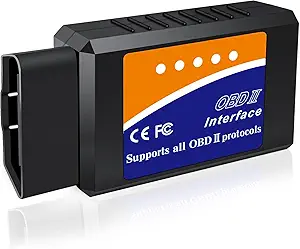 | Best Budget Pick | Connectivity: Bluetooth | Compatibility: iOS, Android, Windows PC | Supported Vehicles: Most 1996+ OBDII-compliant gas and diesel vehicles | VIEW ON AMAZON | See Our Full Breakdown |
| Vgate iCar Pro Bluetooth/BLE4.0 OBD2 Scanner Code Reader Diagnostic Tool |  | Best for Hybrid Owners on a Budget | Connectivity: Bluetooth 3.0 / BLE 4.0 | Compatibility: iOS, Android, Windows | Supported Vehicles: 1996+ OBD2 compliant models, including hybrid and fuel vehicles | VIEW ON AMAZON | See Our Full Breakdown |
| OBDLink CX BimmerCode Bluetooth 5.1 OBD2 Adapter for BMW/Mini |  | Best for BMW/Mini Coding | Compatibility: BMW and Mini vehicles | Connectivity: Bluetooth 5.1 | Supported Devices: iPhone/iOS and Android | VIEW ON AMAZON | See Our Full Breakdown |
| bluetooth obd2 adapter | Compatibility | Connectivity |
|---|---|---|
| OBD2 Bluetooth Scanner SinoTra | Most 1996+ US vehicles (gasoline & diesel) | Bluetooth 4.2 |
| Veepeak OBDCheck BLE+ Bluetoot | — | — |
| Vgate vLinker MC+ Bluetooth OB | iOS, Android, Windows | — |
| BlueDriver OBD2 Scanner Blueto | — | — |
| ViaBecs Bluetooth 5.1 OBD2 Sca | 12V gasoline vehicles | Bluetooth 5.1 |
| Veepeak OBDCheck BLE Bluetooth | Most 1996+ cars and light trucks in the US | — |
| OBDLink MX+ OBD2 Bluetooth Sca | iPhone, Android, Windows | — |
| Veepeak Mini Bluetooth OBD2 Sc | Android phones/tablets only | Classic Bluetooth |
| V011 OBD2 Scanner Bluetooth 5. | iOS & Android | Bluetooth 5.4 |
| OBD2 Bluetooth Scanner Car Dia | Android (not supported on iOS) | Bluetooth 2.1 |
| Vgate iCar Pro Bluetooth 4.0 O | — | — |
| OBDLink LX Bluetooth 3.0 OBD2 | Android and Windows; not compatible with iOS | Bluetooth 3.0 |
| Bluetooth OBD2 Scanner Car Cod | iOS, Android, Windows PC | Bluetooth |
| Vgate iCar Pro Bluetooth/BLE4. | iOS, Android, Windows | Bluetooth 3.0 / BLE 4.0 |
| OBDLink CX BimmerCode Bluetoot | BMW and Mini vehicles | Bluetooth 5.1 |
More Details on Our Top Picks
OBD2 Bluetooth Scanner SinoTrack Car Diagnostic Tool for iOS & Android
This compact scanner stands out for its broad vehicle compatibility and user-friendly setup, making it ideal for everyday car owners who want reliable diagnostics without a trip to the mechanic. Unlike the BlueDriver, which offers more detailed technician-level data, SinoTrack provides straightforward fault codes and live data, but it doesn’t support hybrid or electric vehicles, limiting its scope. Its plug-and-play design and multi-language support make it accessible for most users, though Bluetooth connection issues on iOS can sometimes require fiddling with WiFi settings. Compared to the Veepeak BLE+, SinoTrack’s comprehensive vehicle coverage and easier app integration make it a better choice for those new to diagnostics, but it sacrifices some advanced features and detailed data.
Pros:- Plug-and-play setup with a dedicated mobile app
- Supports comprehensive vehicle diagnostics and real-time data
- Compatible with most 1996+ US vehicles
- Affordable alternative to professional diagnostics
Cons:- Limited support for hybrid and electric vehicles
- Bluetooth connection on iOS can sometimes be problematic
- Cannot read transmission temperature
Best for: Owners of 1996+ US gasoline or diesel vehicles seeking easy, reliable diagnostics.
Not ideal for: Hybrid or electric vehicle owners who need support for high-voltage systems or advanced diagnostics.
- Compatibility:Most 1996+ US vehicles (gasoline & diesel)
- Connectivity:Bluetooth 4.2
- Languages:16 languages including Spanish
- App Compatibility:iOS & Android
- Warranty:2 years
Our verdict“This scanner makes the most sense for everyday owners who want quick, reliable diagnostics for common vehicles without needing advanced features.”
Veepeak OBDCheck BLE+ Bluetooth OBD II Scanner for iOS & Android
Compared with the SinoTrack, the Veepeak BLE+ offers flexible app options and compatibility, making it a solid budget choice for tech-savvy users comfortable with third-party apps. While it supports basic functions like reading and clearing trouble codes, it doesn’t provide the detailed live data or system tests that BlueDriver offers, which might be a drawback for those wanting more comprehensive diagnostics. Its Bluetooth LE connection ensures low power consumption, but the need for compatible third-party apps can sometimes lead to additional costs or setup complexity. If you’re looking for a budget-friendly device that works across multiple platforms, Veepeak’s broad app support makes it a compelling pick, though it lacks the advanced vehicle-specific diagnostics of pricier models.
Pros:- Affordable price point for basic diagnostics
- Compatible with many popular third-party apps
- Supports both iOS and Android via Bluetooth LE
- Low power consumption with energy-efficient design
Cons:- Limited to basic fault code reading and clearing
- Requires third-party app setup and potential extra costs
- Lacks support for advanced diagnostics like ABS or TPMS
Best for: DIY enthusiasts who want a low-cost, versatile OBD2 scanner compatible with multiple apps and platforms.
Not ideal for: Users seeking in-depth diagnostics like ABS, SRS, or transmission data, or those who prefer a plug-and-play experience with minimal setup.
- Product Type:Bluetooth OBD II scanner
- Connection:Bluetooth LE
- Mobile Compatibility:iOS and Android
- Vehicle Compatibility:1996+ OBD-II compliant vehicles
- Diagnostic Functions:Read/clear trouble codes, freeze frame, I/M readiness
- Supported Apps:Car Scanner, Torque, DashCommand, and more
Our verdict“Ideal for budget-conscious users who want a flexible, multi-platform OBD2 scanner for simple vehicle checks.”
Vgate vLinker MC+ Bluetooth OBD2 Car Scan Tool for iOS, Android, Windows
This versatile device excels for users who need compatibility across iOS, Android, and Windows, supporting multiple protocols for a broad range of vehicles. Unlike the Veepeak BLE+ or SinoTrack, the vLinker MC+ emphasizes high data transfer speeds and broad protocol support, making it suitable for more advanced diagnostics or users managing multiple device ecosystems. Its support for SW-CAN, MS-CAN, and all five standard OBD2 protocols allows it to access data from more complex vehicle networks. However, its setup can be more involved, and the limited information on firmware updates suggests it may require some technical know-how. For those needing a multi-platform, protocol-rich tool, this model offers impressive versatility but with a slightly steeper learning curve.
Pros:- Supports multiple protocols including SW-CAN and MS-CAN
- Compatible with iOS, Android, and Windows devices
- High data transfer capabilities and energy efficiency
- Supports advanced diagnostics for complex vehicle networks
Cons:- Setup and configuration can be complex for novices
- Limited info on firmware updates and software support
- Customer reviews indicate occasional connectivity issues
Best for: Tech-savvy car owners and professionals who need cross-platform compatibility and broad protocol support.
Not ideal for: Casual users or those seeking plug-and-play simplicity without the need for extensive setup or vehicle-specific features.
- Protocol Support:SW-CAN, MS-CAN, all five OBD2 protocols
- Compatibility:iOS, Android, Windows
- Weight:80 g
- Model Number:vLinker MC+ BLE4.0
- Manufacturer:Vgatemall
- Best Sellers Rank:#4,923 in Automotive
Our verdict“This model suits users needing broad protocol support and multi-platform compatibility, especially for more complex or professional diagnostics.”
BlueDriver OBD2 Scanner Bluetooth, No Subscription, ABS SRS TPMS
BlueDriver stands out for its detailed, technician-verified diagnostics and extensive vehicle coverage, making it the preferred choice for those who want professional-quality data directly on their phone. Unlike the simpler SinoTrack or Veepeak, BlueDriver offers expanded coverage for ABS, SRS, TPMS, and transmission systems, with real-time data and verified fix reports. Its ability to provide detailed fault descriptions, causes, and confirmed fixes saves time and money, especially for owners of newer or complex vehicles. However, the higher price and reliance on a proprietary app mean it’s less suited for casual users or those on a tight budget. If you need a tool that approaches dealership-level diagnostics without the cost, BlueDriver is the premium pick, though it doesn’t support hybrid or electric systems yet.
Pros:- Extensive vehicle coverage including ABS, SRS, and TPMS
- Verified repair reports with detailed causes and fixes
- Real-time data and freeze frame viewing
- No subscription fees, full feature access
Cons:- Higher price point compared to basic scanners
- Requires proprietary BlueDriver app, limiting flexibility
- Limited support for hybrid and electric vehicles
Best for: Car owners and enthusiasts who want detailed, reliable diagnostics with verified repair information and broad system coverage.
Not ideal for: Budget-conscious owners or electric/hybrid vehicle owners who need support for high-voltage or hybrid systems.
Our verdict“This device is best for owners seeking professional-grade diagnostics and fixed repair guidance for everyday vehicles.”
ViaBecs Bluetooth 5.1 OBD2 Scanner Adapter for iPhone & Android
The ViaBecs Bluetooth 5.1 adapter offers a reliable, straightforward tool for quick diagnostics and vehicle monitoring. Its support for 9 common protocols makes it compatible with most 12V gasoline vehicles, and the plug-and-play setup with popular apps like Torque and DashCommand simplifies the process for everyday users. Unlike the BlueDriver, it doesn’t provide detailed repair reports or advanced diagnostics, but it excels at displaying live data like RPM, coolant temperature, and VIN, making it ideal for regular monitoring and basic troubleshooting. Its Bluetooth 5.1 ensures a stable connection, though it doesn’t support hybrid or diesel-specific diagnostics. For users who want a simple, cost-effective solution for routine checks, ViaBecs delivers solid performance.
Pros:- Supports multiple protocols and is compatible with popular apps
- Stable Bluetooth 5.1 connection
- Displays live data including RPM, coolant temp, and VIN
- Plug-and-play, no extra cables needed
Cons:- Limited to basic fault code reading and live data
- Does not support advanced diagnostics like ABS or SRS
- Limited vehicle compatibility outside 12V gasoline models
Best for: Home mechanics and car owners who need a simple, reliable tool for regular vehicle monitoring.
Not ideal for: Owners of hybrid, diesel, or high-tech vehicles requiring advanced diagnostics or repair guidance.
- Brand:ViaBecs
- Model Number:OBD-BT-FBA-OUS
- Connectivity:Bluetooth 5.1
- Compatibility:12V gasoline vehicles
- Protocols Supported:9 protocols including ISO and CAN
- Live Data:RPM, speed, coolant temp, VIN
Our verdict“Best suited for users seeking an easy, reliable device for basic vehicle health checks and routine diagnostics.”
Veepeak OBDCheck BLE Bluetooth OBD II Scanner for iOS & Android
The Veepeak OBDCheck BLE stands out for its broad compatibility with most 1996+ vehicles and support for multiple popular apps like Torque and OBD Fusion. Compared with the Veepeak Mini Bluetooth OBD2 Scanner, it offers wireless Bluetooth LE connectivity, which simplifies setup and use on compatible smartphones. However, it remains limited to basic diagnostics—no support for advanced functions like ABS or SRS resets, making it less suitable for users needing deeper vehicle control. Its inclusion of a carrying case adds portability, but the reliance on third-party apps means some features might require extra purchases or familiarity. This model is ideal for casual users or beginners who want straightforward engine monitoring without complex diagnostics. Skipping it makes sense for those needing manufacturer-specific functions or advanced features not supported here.
Pros:- Compatible with a wide range of vehicles (1996+)
- Supports Bluetooth LE for easy wireless connection
- Includes a carrying case for portability
Cons:- Limited to basic OBD-II functions; no advanced diagnostics
- Requires third-party apps for operation
- Compatibility:Most 1996+ cars and light trucks in the US
- Connection:Bluetooth LE (iOS & Android)
- Supported Functions:Read & clear trouble codes, view freeze frame data, I/M readiness, live sensor data
- App Compatibility:Car Scanner, Torque, OBD Fusion, BimmerCode, BimmerLink
- Includes:OBD-II Scanner, carrying case, user instructions
- Warranty:1 year
Our verdict“A practical choice for users who want simple, wireless engine diagnostics compatible with most older vehicles.”
OBDLink MX+ OBD2 Bluetooth Scanner for iPhone, Android, and Windows
The OBDLink MX+ is a robust choice for those seeking detailed vehicle data, supporting OEM-specific functions for brands like Ford, GM, and Toyota. Unlike the Veepeak OBDCheck BLE, it offers support for advanced diagnostics, including ABS and TPMS, making it suitable for enthusiasts or professional use. Its firmware update feature and over-voltage protection add reliability, but these features require internet access and some familiarity with diagnostic tools. Compatibility with multiple platforms and apps like FORScan and Dashcommand makes it versatile, though it may be overkill for someone only needing basic code reading. This scanner makes the most sense for users who want in-depth data and are comfortable with more complex diagnostics. Those only doing simple engine checks should consider more straightforward options like Veepeak’s basic model.
Pros:- Supports comprehensive vehicle parameters including ABS and TPMS
- Compatible with multiple devices and diagnostic apps
- Includes firmware updates and protection features
Cons:- Requires checking vehicle compatibility before purchase
- Some features need specific app subscriptions
- Compatibility:iPhone, Android, Windows
- Supported Apps:FORScan, Torque, BimmerCode, Dashcommand, AlfaOBD, Carista
- Protection:Over-voltage and battery drain protection
- Features:OEM support for multiple brands
Our verdict“Ideal for car enthusiasts or professionals needing detailed diagnostics and OEM support across multiple brands.”
Veepeak Mini Bluetooth OBD2 Scanner Code Reader for Android
The Veepeak Mini Bluetooth OBD2 Scanner offers a compact design and affordability primarily for Android users. Compared with the Veepeak OBDCheck BLE, it lacks Bluetooth LE and only supports Classic Bluetooth, which can affect connection stability and power efficiency. Its compatibility is limited to Android devices, excluding iOS users who need wireless connectivity. It covers standard diagnostics like reading/clearing codes and monitoring live data, but does not support advanced functions like ABS or transmission diagnostics, similar to the Veepeak OBDCheck BLE. The small profile and low cost make it suitable for those new to vehicle diagnostics or on a tight budget. However, if you have an iPhone or want more advanced features, this model may fall short.
Pros:- Compact, low-profile design
- Works with popular Android apps like Torque and Car Scanner
- Affordable for entry-level diagnostics
Cons:- Not compatible with iOS devices
- Limited to basic engine diagnostics
- Connectivity:Classic Bluetooth
- Compatibility:Android phones/tablets only
- Vehicle Coverage:Most 1996+ US cars and light trucks
- Diagnostics Supported:Read/clear codes, live data, freeze frame, I/M readiness
- Design:Compact plug-in
Our verdict“A good entry-level choice for Android users seeking simple engine check capabilities without extra features.”
V011 OBD2 Scanner Bluetooth 5.4 Diagnostic Tool for iOS & Android
The V011 OBD2 Scanner stands out for supporting over 96% of vehicle makes from 1996 onward and featuring Bluetooth 5.4 for fast, stable connections. Its user-friendly app offers visualized sensor data, fix suggestions, and DTC management, making it suitable for beginners who want quick insights. Compared with the OBDLink MX+, it sacrifices some advanced OEM functions but offers excellent ease of use, especially for those new to diagnostics. Its broad protocol support and multilingual manual add to its appeal, but reliance on the free OBD Home app limits customization and advanced diagnostics. This scanner suits owners who want a hassle-free experience with clear, visual data—less ideal for those needing in-depth vehicle control or manufacturer-specific diagnostics.
Pros:- Supports over 96% of makes/models from 1996+
- Intuitive app with visual data and fix tips
- Fast, reliable Bluetooth 5.4 connection
Cons:- Limited to the OBD Home app; cannot clear codes without repairs
- iPhone setup can be confusing for some users
- Model:V011
- Connectivity:Bluetooth 5.4
- Compatibility:iOS & Android
- Protocols Supported:9
- Vehicle Coverage:96%+ of makes/models, 1996+
- App:OBD Home
Our verdict“A solid choice for beginners seeking broad compatibility and straightforward, visual vehicle data.”
OBD2 Bluetooth Scanner Car Diagnostic Tool
The OBD2 Bluetooth Scanner Car Diagnostic Tool offers a straightforward, affordable solution for Android owners who want quick engine trouble code access and basic live data. Unlike the Veepeak Mini, it supports a broader range of diagnostics on Android platforms, but it does not support iOS at all. Its Bluetooth 2.1 connection, while reliable, is less fast and power-efficient than newer standards like Bluetooth 5.4. It is designed for simple diagnostics—reading and clearing codes—and is not suited for vehicle-specific functions or advanced diagnostics like ABS or transmission data. This makes it appropriate for users who want a portable, no-fuss device to check engine lights without extra bells and whistles. For those seeking deeper diagnostics or iOS compatibility, this model would not be the best fit.
Pros:- Simple setup and use
- Compatible with multiple diagnostic apps
- Affordable and portable
Cons:- Limited to Android; no iOS support
- Only Bluetooth 2.1; slower and less efficient
- Connectivity:Bluetooth 2.1
- Compatibility:Android (not supported on iOS)
- Supported Software:Torque, OBD range, Scan Master ELM
- Password:1234 or 0000
Our verdict“A practical, budget-friendly scanner for Android users focused on basic engine diagnostics without advanced features.”
Vgate iCar Pro Bluetooth 4.0 OBD2 Fault Code Reader for iOS/Android
The Vgate iCar Pro stands out for its 3mA sleep mode, which means you can leave it in your OBD2 port for weeks without killing your battery — a real advantage over the generic OBD2 Bluetooth Scanner (B07CP5ZJVQ), which asks you to unplug between drives. Compared with the OBDLink LX, the iCar Pro adds iOS support and Bluetooth 4.0 (BLE), making it the friendlier cross-platform choice. Firmware updates extend its useful life, and broad app support (Torque, Car Scanner, OBD Fusion, Dr. Prius) means you’re not locked into one ecosystem. The tradeoff is that it’s standard OBD2 only — no ABS, SRS, or transmission diagnostics — so anyone wanting dealer-level access should look at the OBDLink MX+ instead.
Pros:- 3mA sleep mode makes it safe to leave permanently plugged in
- Works with both iOS and Android via Bluetooth 4.0 (BLE)
- Firmware updates keep it compatible over time
- Broad third-party app support including Torque and OBD Fusion
Cons:- Limited to standard OBD2 functions — no ABS or SRS support
- Auto-wake may not function on electric or hybrid vehicles
- Some app features require in-app purchases
Best for: Daily drivers who want a set-and-forget adapter that stays plugged in and pairs with whatever phone they own
Not ideal for: Owners troubleshooting ABS or airbag warning lights — it covers engine codes only
- Vehicle Compatibility:12V gasoline after 1996; light-duty diesel up to 6.5 tons
- Bluetooth Version:4.0 (BLE)
- Power Consumption:As low as 3mA in sleep mode
- LED Indicators:Red, green, and blue status lights
- Firmware Updates:Supported
- Compatible Apps:Torque, Car Scanner ELM327, OBD Fusion, OBD JScan, Dr. Prius, and more
Our verdict“If you want a forget-it’s-there adapter that works on any phone, this is the one; skip it if you need anything beyond engine diagnostics.”
OBDLink LX Bluetooth 3.0 OBD2 Adapter for MotoScan, Torque, Hybrid Assistant (Android Only)
The OBDLink LX earns its spot through sheer polish: hacker-proof wireless security, fast data throughput, and bundled software (OBDLink for Android, OBDwiz for Windows) that most cheap adapters can’t match. Compared with the Vgate iCar Pro, the LX reads data faster and more reliably, and its MotoScan recommendation makes it the pick for BMW motorcycle coding — something no other adapter in this roundup offers. The 3-year warranty also dwarfs the 1-year coverage on the Vgate models. But the tradeoff is serious: no iOS support at all, and it won’t work on hybrid or electric vehicles. If you’re an iPhone household, the iCar Pro or Veepeak BLE+ are better fits.
Pros:- Fast, accurate diagnostics across all 1996+ US cars and light trucks
- Safe to leave plugged in without draining the battery
- Includes free OBDLink and OBDwiz software plus Torque and MotoScan support
- 3-year repair-or-replace warranty
Cons:- Not compatible with Apple iOS devices
- Does not work with hybrid or electric vehicles
Best for: Android or Windows users, especially BMW motorcyclists using MotoScan, who want fast and secure diagnostics
Not ideal for: iPhone owners — Bluetooth 3.0 means zero iOS compatibility
- Brand:OBDLink (OBD Solutions)
- Model Number:LX101
- Connectivity:Bluetooth 3.0
- Compatibility:Android and Windows; not compatible with iOS
- Weight:1.1 ounces
- Included Software:OBDLink (Android), OBDwiz (Windows)
- Warranty:3-year repair-or-replace
Our verdict“The most dependable Android-only option here — buy it for speed and MotoScan support, avoid it entirely if you use an iPhone.”
Bluetooth OBD2 Scanner Car Code Reader for iOS, Android and Windows
This unbranded scanner is the cheapest credible entry in the roundup, and it covers the basics well: read and clear codes, reset the check engine light, and stream live sensor data across iOS, Android, and Windows. Its 3,000+ code definitions database saves you from Googling every P-code, and support for all 9 OBDII protocols means it will talk to older Fords and GMs that trip up lesser clones. That said, it lacks the low-power sleep mode of the Vgate iCar Pro, so leaving it plugged in is a battery risk, and connection stability won’t match the OBDLink LX. Exclusions matter too: no motorcycles, no 24V diesel, no hybrids. For occasional check-engine-light checks, though, it’s hard to argue with the price.
Pros:- Very low price with iOS, Android, and Windows support
- All 9 OBDII protocols covered, including older J1850 vehicles
- Built-in database of 3,000+ generic code definitions
- Works with popular free apps like Torque, Car Scanner, and OBD Fusion
Cons:- No support for motorcycles, 24V diesel, hybrid, or new energy vehicles
- iOS connection must be made through a compatible app, not Bluetooth settings
- Available features vary by vehicle, ECU, and app
Best for: Budget-conscious owners who only need occasional code reading and live data on a 1996+ gas or diesel car
Not ideal for: Hybrid and EV owners, or anyone wanting a permanently installed adapter — no sleep mode and no new-energy vehicle support
- Connectivity:Bluetooth
- Compatibility:iOS, Android, Windows PC
- Supported Vehicles:Most 1996+ OBDII-compliant gas and diesel vehicles
- Protocols Supported:All 9 OBDII protocols
- Code Definitions:Over 3,000 generic definitions
- Compatible Apps:Torque, DashCommand, Car Scanner, OBD Auto Doctor, inCarDoc, OBD Fusion, and more
- Not Supported:Motorcycles, 24V diesel, hybrid, and new energy vehicles
Our verdict“The best cheap way to diagnose a check-engine light on a standard gas or diesel car — just don’t expect it to stay plugged in or handle hybrids.”
Vgate iCar Pro Bluetooth/BLE4.0 OBD2 Scanner Code Reader Diagnostic Tool
This variant of the iCar Pro is the rare budget adapter that officially supports hybrid vehicles alongside standard 1996+ gas models — something the OBDLink LX explicitly refuses and the generic budget scanner (B07CP5ZJVQ) excludes outright. Its over-voltage, over-heat, and over-current protection is a meaningful safety layer when you’re plugging cheap electronics into an expensive car, and its 3mA low-power mode matches the original iCar Pro for leave-in convenience. The tradeoffs: like its sibling, it’s standard OBD2 only, manufacturer-specific diagnostics are off the table, and some advanced functions sit behind paid app upgrades. If you drive a Prius or similar hybrid and don’t want to pay OBDLink MX+ money, this is the sensible middle ground.
Pros:- Official hybrid vehicle support at a budget price
- Over-voltage, over-heat, and over-current protection built in
- 3mA low-power mode for safe leave-in use
- Works across iOS, Android, and Windows
Cons:- Advanced features require additional software purchases
- Limited manufacturer-specific diagnostic support
- Wake-up function limited to gasoline, hybrid, and electric cars
Best for: Hybrid vehicle owners who want affordable, protected diagnostics without stepping up to premium adapters
Not ideal for: Owners wanting dealer-level or manufacturer-specific diagnostics — this covers generic OBD2 functions only
- Connectivity:Bluetooth 3.0 / BLE 4.0
- Compatibility:iOS, Android, Windows
- Supported Vehicles:1996+ OBD2 compliant models, including hybrid and fuel vehicles
- Protection Features:Over-voltage, over-heat, over-current
- Power Consumption:3mA low power mode
- Warranty:1 year
Our verdict“The affordable hybrid-friendly pick in this lineup — buy it for protected everyday diagnostics, skip it if you need deep manufacturer-level access.”
OBDLink CX BimmerCode Bluetooth 5.1 OBD2 Adapter for BMW/Mini
The OBDLink CX is a purpose-built tool: it exists to run BimmerCode on BMWs and Minis, unlocking features like video-in-motion tweaks, corner lights, and battery registration that generic scanners can’t touch. Its Bluetooth 5.1 connection is the most modern in this roundup, and its stability isn’t a luxury — a dropped connection mid-coding can leave an ECU in a bad state, which is why the cheap generic adapter (B07CP5ZJVQ) is genuinely risky for this job. Pairing works equally well on iOS and Android. The catch is that it’s useless outside the BMW/Mini ecosystem, and the BimmerCode app costs extra on top of the adapter — an honest but real cost stack. For anyone coding a BMW, though, this is the adapter BimmerCode itself recommends.
Pros:- Purpose-built for BimmerCode coding on BMW and Mini
- Bluetooth 5.1 with stable connection that protects against ECU corruption
- Easy in-app pairing on both iOS and Android
- Supports live parameter monitoring and check-engine light clearing
Cons:- BimmerCode app sold separately, adding to total cost
- Requires a compatible app for any real functionality
- No included software in the purchase price
Best for: BMW and Mini owners who want to code hidden features and customize vehicle behavior with BimmerCode
Not ideal for: Owners of other vehicle brands — it’s essentially a single-ecosystem tool
- Compatibility:BMW and Mini vehicles
- Connectivity:Bluetooth 5.1
- Supported Devices:iPhone/iOS and Android
- Features:Car coding, diagnostics, live parameter monitoring, check-engine light clearing
- Required App:BimmerCode (sold separately)
- Included Software:None — app purchased separately
Our verdict“If you drive a BMW or Mini and want to code features, this is the safe, recommended adapter — everyone else should buy a general-purpose scanner instead.”
How We Picked
To determine the rankings, I evaluated each Bluetooth OBD2 adapter based on performance, build quality, ease of use, compatibility, and value. Devices with faster, more stable Bluetooth connections and broad platform support scored higher, as these directly impact user experience. Durability and ease of setup also played roles, along with additional features like live data or advanced diagnostics. Price was considered relative to features, ensuring that higher-cost options offered tangible benefits. This approach ensures that the selected adapters cater to a range of needs, from casual users to professional-grade diagnostics.Factors to Consider When Choosing Bluetooth Obd2 Adapter
Choosing the right Bluetooth OBD2 adapter involves understanding several key factors that influence usability, reliability, and value. Beyond just compatibility, consider how easy it is to set up and whether the device offers features that match your diagnostic needs. The following guide highlights the most critical aspects to keep in mind to make an informed decision.Compatibility and Device Support
Make sure the adapter is compatible with your vehicle’s make, model, and year, as well as your smartphone operating system—iOS, Android, or Windows. Some adapters are optimized for specific platforms, which can affect functionality and ease of use. Choosing a device with broad support minimizes the risk of connectivity issues and ensures future flexibility as your device ecosystem evolves.
Bluetooth Version and Connection Stability
The Bluetooth version directly impacts connection reliability and data transfer speed. Bluetooth 4.0 and above generally provide more stable links and lower latency, especially important if you plan to stream live data or perform advanced diagnostics. Cheaper adapters with older Bluetooth versions may experience dropouts, disrupting your diagnostic workflow.
Ease of Setup and Use
Look for adapters that are straightforward to install and pair without extensive configuration. Devices with clear instructions or dedicated apps tend to reduce frustration, especially for beginners. An intuitive app interface that displays data clearly can significantly enhance your diagnostic experience and reduce the learning curve.
Additional Features and Diagnostic Capabilities
Not all adapters support the same diagnostic functions. If you need advanced features like live data streaming, freeze frame data, or ABS/SRS diagnostics, verify that your chosen model supports these. Some budget options may only read basic trouble codes, limiting their usefulness for comprehensive vehicle analysis.
Price and Value
Higher-priced adapters often provide faster data transfer, more reliable connectivity, and extra features. However, for casual users or those on a budget, a more affordable model might suffice. Balance your specific diagnostic needs with your budget to avoid paying for features you won’t use, but don’t compromise on core reliability and compatibility.
Frequently Asked Questions
Will my older vehicle work with a Bluetooth OBD2 adapter?
Most vehicles manufactured after 1996 are OBD2 compliant and should work with standard Bluetooth OBD2 adapters. However, it’s important to verify your vehicle’s compatibility, especially for models that might have unique diagnostic port configurations or require specific protocols. Checking your vehicle’s manual or consulting online forums can prevent potential compatibility issues.
Can I use one Bluetooth OBD2 adapter with multiple devices?
Yes, many Bluetooth adapters can connect to multiple devices, but typically only one at a time. The connection process usually involves pairing the device with each smartphone or tablet individually. If you plan to switch frequently between devices, look for adapters with easy pairing and fast reconnect features to streamline the process.
Does a higher price mean better diagnostics?
Not necessarily. While higher-end adapters like the OBDLink MX+ often offer faster data transfer, broader compatibility, and extra features, a lower-cost model can still perform basic diagnostic functions effectively. Consider your specific needs—if you require advanced diagnostics or real-time data streaming, investing in a premium model makes sense. For casual monitoring or code reading, budget options often suffice.
Are Bluetooth adapters safe to leave plugged in?
Most Bluetooth OBD2 adapters are designed for continuous use and are safe to leave in your vehicle. However, prolonged exposure to extreme temperatures or moisture can affect their longevity. It’s advisable to remove the device if you’re parking in severe weather conditions or for extended periods to preserve its lifespan.
What should I do if my Bluetooth connection keeps dropping?
Frequent disconnections can stem from outdated Bluetooth firmware, interference, or low battery in your device. Try updating the adapter’s firmware if available, ensure your smartphone’s Bluetooth is functioning correctly, and keep the device away from other wireless sources. Restarting both devices and re-pairing often resolves temporary connectivity issues.
Conclusion
The best overall choice for most users remains the OBDLink MX+ due to its speed, reliability, and cross-platform support. For those seeking value without sacrificing core functions, the Veepeak OBDCheck BLE+ offers excellent performance at a lower cost. Buyers new to vehicle diagnostics or on a tight budget might prefer the Veepeak Mini Bluetooth OBD2 Scanner for simplicity and affordability. For specialized needs like BMW diagnostics, the OBDLink CX is the go-to, while professionals requiring comprehensive data might lean toward options like the BlueDriver. Clarify your vehicle compatibility, desired features, and budget to choose the best Bluetooth OBD2 adapter for your situation.